SuiteMigration Review: QuickBooks & Xero to NetSuite Without the Spreadsheet Marathon (2026)
SuiteMigration migrates full financial histories from QuickBooks Online, Desktop, Enterprise, and Xero into NetSuite—with NetSuite-to-NetSuite consolidations,…

Reviewing SuiteMigration · Published · 13 min read
Opening
NetSuite go-lives often stall on matching “Office Exp.” to “6000 · Office Supplies,” reconciling vendor duplicates that differ by a comma, and rebuilding mapping spreadsheets every time the client sends “updated data.” Traditional QuickBooks or Xero cutovers stretch into weeks of VLOOKUPs, CSV splits under NetSuite’s import caps, and trial-balance detective work that still cannot prove two opposite errors did not cancel out.
SuiteMigration is a data migration platform aimed at that bottleneck. It connects QuickBooks Online, QuickBooks Desktop, QuickBooks Enterprise, or Xero to NetSuite, runs a free readiness scan against NetSuite’s import rules, maps master data and transactions in-product, rehearses in sandbox, then pushes production with period-by-period trial balance and per-record audit reports. NetSuite itself is also a supported source for consolidations into another NetSuite account.
On Launchpadly, SuiteMigration is a Premium / Featured SaaS listing (Week 44 / 2026, approved 2026-10-22) with the tagline NetSuite migrations that don't drag on for months. Founder account: @listings4. Site: https://suitemigration.com/. Legal entity on the privacy policy: SuiteMigration, Inc. (Las Vegas, NV).
Disclosure: Independent Launchpadly editorial from public pages reviewed October 2026. We did not connect a live QuickBooks/Xero org, push a NetSuite sandbox, or receive a project quote. Demo UI numbers on marketing pages (customer counts, period grids) are illustrative. Confirm scope, quote, and security commitments with SuiteMigration before you commit client books.
Key takeaways
- SuiteMigration’s job is full financial history into NetSuite—chart of accounts, customers, vendors, items, employees, inventory/opening balances, journal entries, and transactional history (types listed on-site)—not a one-shot opening-balance dump.
- Live sources: QuickBooks Online, Desktop, and Enterprise, Xero, and NetSuite → NetSuite. Epicor, Acumatica, Microsoft Dynamics, and Infor are listed as coming; do not buy today expecting those.
- Account and Migration Readiness Audit are free (no card); you pay per migration with unlimited users, unlimited sandbox/production pushes, and support included. No public list price—quotes depend on data level, source orgs, history depth, source system, and complexity.
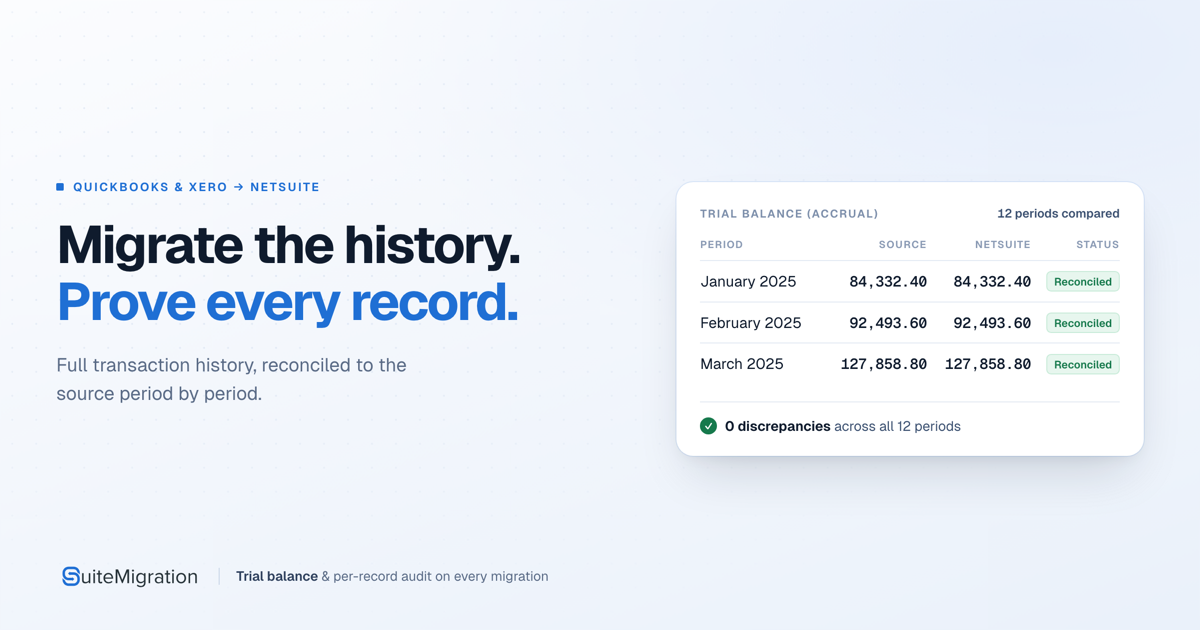
- Proof differentiator: period-by-period trial balance plus per-record audits after 1–3 sandbox runs. A matching grand total alone is treated as insufficient.
- Primary buyers are NetSuite implementation partners (they pay SuiteMigration; client billing stays theirs). Mid-market DIY is possible with a NetSuite-certified Admin; the vendor still recommends a partner for most company-led projects.
What is SuiteMigration?
SuiteMigration moves and transforms ERP financial data into NetSuite. Privacy copy is blunt: it sells software access, not mined customer data. The Workspace holder—often a consultancy acting for a client—controls which systems connect and what migrates; SuiteMigration processes Migration Data as a processor under that organization’s instructions (DPA, updated July 28, 2026; Privacy Policy, July 27, 2026).
Published loop (How it works):
- Connect source (QuickBooks / Xero / NetSuite) and destination NetSuite.
- Migration Readiness Audit — free scan of what NetSuite will reject (display-name limits, duplicate items, malformed URLs, multi-email fields, and similar).
- Map accounts, classes, locations, tax codes, entities; ambiguous rows flagged rather than silently guessed; bulk mapping upload for multi-entity work.
- Sandbox push — typically one to three times; clear and re-push if wrong.
- Production push at a controlled cutoff with relationships preserved.
- Trial balance + per-record audit before treating go-live as done.
It is not a full NetSuite implementation practice, not a generic iPaaS, and not a substitute for COA design, subsidiary structure, or change management. It compresses the data migration slice that otherwise burns consultant hours.
Named partner example on the NetSuite consultants page during research: Availent Systems (Oracle NetSuite Alliance Partner since 2012)—a public reference, not an exhaustive directory.
Evaluation methodology
Reviewed October 2026 against public materials only:
- Home, How it works, Pricing, NetSuite consultants / partners
- Privacy Policy (2026-07-27), DPA (2026-07-28; security annex / AI notes)
- Launchpadly
/startup/suitemigration
We did not run a readiness audit on real books, complete partner onboarding, or independently time a CSV migration. “Fraction of the time” vs “3–6 months” and partner-page “dramatic reduction” language are vendor marketing, not a measured SLA. Competitive notes are category framing (CSV, conversion bureaus, iPaaS, manual partner labor)—not named-competitor attacks from SuiteMigration.
Product overview
The problem it actually attacks
Homepage and partner materials describe familiar failure modes: chart-of-accounts matching marathons, near-duplicate vendors, mapping workbooks that die on refreshed source data, and dirty-data discovery after the quote was sold. NetSuite CSV imports also hit practical ceilings (partner page cites 25,000 records per import), turning multi-year history into file stacks and silent failures.
The product bet: keep mappings, validation, push logs, and reconciliation inside the platform, so refreshed source data and sandbox retries do not mean rebuilding Excel from zero.
Who it is for
| Buyer | Why SuiteMigration |
|---|---|
| NetSuite partners | Sell full-history migration, white-label the free readiness report, keep client relationship/billing, pay SuiteMigration per project |
| Mid-market companies | Possible self-serve path with an in-house NetSuite-certified Admin; vendor still steers most buyers toward partners |
Multi-org consolidation is first-class: pricing FAQ cites as many as 30 QuickBooks orgs into one NetSuite org. Several source files can point at one destination.
What gets migrated (as published)
Complete financial history as listed on-site: chart of accounts, vendors/customers, items, inventory and opening balances, journal entries, open sales orders, AR/AP documents, historical transactions (invoices, bills, receipts, credits, POs, payments, refunds, transfers, checks), plus employees, projects, classes, tax codes, and custom fields. Relationships—payments to invoices, subsidiary/department/location/class—are part of the go-live claim. Confirm the record-type matrix for your source edition; Desktop/Enterprise and Online are not identical APIs.
Key features
Free Migration Readiness Audit
The audit reads the full source dataset and lists what NetSuite will reject by name, not as a vague quality score. Homepage sample books show dozens to hundreds of customers/vendors/items/employees flagged. Partners can hand clients a white-labeled report before anyone pays for a migration.
Audits stay free before and during a project; no credit card. Unpaid migration data may be deleted after twelve months—do not treat a free audit workspace as indefinite archive.
Guided mapping (with optional AI)
Accounts, classes, locations, tax codes, and entity types map to NetSuite equivalents automatically; ambiguous items surface for human decision. Bulk mapping upload is the multi-entity lever. AI-assisted field-mapping suggestions are optional, click-to-use, run through Amazon Bedrock inside SuiteMigration’s AWS account, and—per privacy/DPA—are not used for model training. AI is an assist; validation and reconciliation are the product.
Sandbox rehearsal → production
How-it-works copy centers on 1–3 sandbox pushes before production. Mistakes cost a clear-and-repush, not unpicking live records. Production is the same rehearsed job at a controlled cutoff—relationships intact.
Trial balance and per-record audit reports
- Trial balance compared period by period across the full TB range (marketing demos show dozens of periods).
- Per-record checks so canceling errors (wrong payment allocation, duplicate vendor, truncated item) surface even when account totals look fine.
Push-result UIs on marketing pages—per-type success rates, “100%” production rows—are illustrative. The editorial point is the design: evidence before finance sign-off.
Security and data handling (as published)
Migration Data and personal information sit in the United States on AWS, with encryption in transit and at rest (where practicable, per DPA annex), optional MFA, and admin logging of pulls/pushes. Billing runs through Stripe (SuiteMigration does not store full card numbers). Optional in-product session recording is designed to mask sensitive text inputs. Marketing-site analytics use self-hosted Umami (cookieless); no ad cookies per privacy copy. Sub-processors are listed on-site.
Buyers with non-US residency rules, or who need a finished SOC 2 report before any connection, should ask for the current attestation set—public pages emphasize controls and US AWS location more than a named certification badge.
Pricing and honesty
What is public
From pricing:
| Included | Notes |
|---|---|
| Free account + unlimited users | Explore and connect without seat fees |
| Free readiness audits | Before commitment and during projects |
| One price per migration | Quote, not a published SKU ladder |
| Unlimited pushes | Sandbox validation and production covered |
| Support | Migration team included, not a tier |
What moves the quote
Two “similar” projects can differ by an order of magnitude:
- Data level — trial-balance-only is simplest/lowest; full GL / transaction history costs more (what most buyers want)
- Number of source organizations — one file vs dozens consolidating
- History depth — opening balances + two years vs a decade
- Source system — QBO / Desktop / Enterprise / Xero / NetSuite expose data differently
- Complexity — multi-currency, heavy classes/locations, unusual COA, high exception counts (the free audit surfaces this early)
Partners pay SuiteMigration directly; volume terms on request. Partner FAQ: no minimum client commitments; onboarding often within about a week after consultation.
Value judgment
This is project infrastructure for ERP cutover, not a $29/mo SaaS seat. Value appears when full history matters commercially, spreadsheet/CSV labor would dominate the timeline, and audit reports justify the quote. Without a public price, run the free audit first, then demand a written quote stating data level, org count, history window, and included push/support terms. Opening balances plus a weekend CSV load? SuiteMigration is likely overbuilt.
How SuiteMigration compares
| Need | Lean SuiteMigration | Lean manual CSV / Excel | Lean opening-balance-only cutover | Lean generic iPaaS |
|---|---|---|---|---|
| Full QuickBooks/Xero history into NetSuite | Core path | Possible, slow, error-prone | Out of scope by design | Possible with heavy custom maps |
| Period TB + per-record proof | Explicit product | Hand tie-out | Weak / none | Build yourself |
| Pre-sale data-quality document | Free white-labelable audit | Ad-hoc | Rare | Rare |
| Multi-org consolidation | Marketed (incl. 30-org anecdote) | Brutal | Usually deferred | Custom |
| Ongoing SaaS sync after go-live | Not the product | N/A | N/A | Often stronger |
Use SuiteMigration when the scarce asset is accurate historical migration with evidence. Use something else for continuous multi-app sync, an unsupported source, or a fixed public price before sales.
Who should use SuiteMigration
- NetSuite implementation partners who lose margin to mapping spreadsheets and want full historical migration as a differentiator.
- Practices that will use the free readiness audit as a white-labeled sales/scoping tool before the SOW.
- Mid-market companies consolidating multiple QuickBooks/Xero entities into one NetSuite when CSV volume caps make history painful.
- Teams that refuse grand-total-only tie-outs and want period and per-record evidence.
- Consultancies comfortable with per-project quotes and keeping client pricing opaque or itemized at their choice.
Who should avoid it
- Buyers who need Epicor / Acumatica / Dynamics / Infor sources now—coming, not shipping.
- Projects that only need opening balances with a cheap, trusted CSV path.
- Organizations that cannot send Migration Data to US AWS, or connect production books without a certification you have not verified.
- Teams expecting a published price card and self-serve checkout with no quote conversation.
- Companies with no NetSuite Admin skill and no willingness to hire a partner.
- Anyone treating “fraction of the time / 3–6 months” marketing as a contractual timeline for their books.
Editorial ratings
Launchpadly editorial judgment from public materials—not a timed lab migration scorecard.
| Category | Score (/10) |
|---|---|
| Connect, audit & guided roadmap | 8 |
| Free audit; quote-only pricing | 7 |
| Optional Bedrock mapping assist | 6 |
| Extract, map, push & reconcile | 9 |
| History, multi-org & audit reports | 8 |
Ease (8): Clear staged journey; free audit creates immediate value. Value (7): Honest shape (free until migration) but dollar opacity forces a sales step. AI (6): Useful optional mapping assist with clean “no training” language; not an AI-first product, so mid-band. Automation (9): Extract→validate→map→sandbox→production→reconcile is the whole point. Depth (8): Strong on QuickBooks/Xero/NetSuite history and proof; narrow on non-listed ERPs.
Pros and cons
Pros
- Full-history QuickBooks/Xero → NetSuite path with NetSuite consolidation support
- Free readiness audit that names rejectable records before you buy
- Sandbox rehearsal culture (1–3 pushes) before production
- Period-by-period trial balance plus per-record audit design
- Per-migration pricing with unlimited users and pushes; partner keeps client billing
- Concrete security/privacy writing (US AWS, optional Bedrock mapping, no AI training on Migration Data)
Cons
- No public price anchors—budgeting requires a quote after audit
- “Coming soon” sources are vapor for buyers on those ERPs today
- Timeline and “100% accuracy” marketing outruns what a third party can verify without a live project
- DIY path exists but is soft-discouraged without a certified NetSuite Admin
- Migration Data is retrieved comprehensively for audit even if you later migrate a subset—connection risk is real before purchase
- Session recording in-product may bother security-sensitive clients until they review sub-processors and masking claims
Real use cases
NetSuite partner scoping a roll-up. Connect the prospect’s QuickBooks Online, run the free audit, white-label findings into the proposal, quote full history for N entities, rehearse in sandbox, push production with TB reports in the go-live pack.
Acquisition cutover. Two charts of accounts, one NetSuite target. Use bulk mapping and multi-source → one destination; put org count and history window in the quote; treat open-order status (pending vs closed) as a human mapping choice the platform surfaces.
History-preserving mid-market DIY. Internal NetSuite Admin connects Xero, cleans from readiness findings, sandboxes until TB periods reconcile, then production. Skip if nobody can interpret NetSuite import failures.
Opening-balance-only project. Probably skip—use a lighter import path unless scope expands to full history.
Verdict
SuiteMigration is a serious NetSuite migration workbench: free readiness proof up front, in-product mapping that survives data refreshes, sandbox rehearsal, and reconciliation reports designed for finance sign-off. Strongest for partners and multi-org / full-history jobs where CSV and Excel quietly eat the budget. Weakest when you need an unsupported source tomorrow, a sticker price before conversation, or only opening balances.
Buy if you implement NetSuite for clients (or run a capable internal Admin team), full history matters, and you will run the free audit before locking scope and price.
Skip if your sources are still on the “coming” list, you cannot accept US-hosted Migration Data processing, or a weekend opening-balance load already solves the problem.
Start at the free Migration Readiness Audit path (or partner consultation), read How it works against your record types, then get a written quote naming data level, org count, history depth, and included pushes/support—before anyone connects production credentials casually.
FAQ
What is SuiteMigration best for?
Migrating complete financial histories from QuickBooks Online/Desktop/Enterprise or Xero into NetSuite (and NetSuite-to-NetSuite consolidations), with readiness validation and audit reports—especially for NetSuite consulting partners.
How much does it cost?
No public dollar ladder. Accounts and readiness audits are free; you pay one quote per migration covering unlimited users, unlimited sandbox/production pushes, and support. Trial-balance-only is lowest; full transaction history costs more. Volume partner terms are case by case.
Is the Migration Readiness Audit really free?
Yes per pricing FAQ: no credit card, usable before or during a project, including as a partner sales tool with white-labeled output.
Which source systems are supported today?
Publicly: QuickBooks Online, Desktop, Enterprise, Xero, and NetSuite as a source. Epicor, Acumatica, Microsoft Dynamics, and Infor are described as coming—confirm live before scoping those.
Can I migrate multiple QuickBooks orgs into one NetSuite?
Yes. Pricing scales with source-org count; marketing cites consolidations up to ~30 QuickBooks orgs into one NetSuite org. Get that count into the quote.
Do end customers pay SuiteMigration directly?
For partner-led work: no—the consultancy pays SuiteMigration. Whether the tool appears as a client line item is the partner’s choice.
How does SuiteMigration prove accuracy?
Vendor process: validate before push, rehearse in sandbox, then provide period-by-period trial balance comparisons and per-record audits so canceling errors surface. We did not independently re-run those reports on live books.
Where is data stored, and is AI training involved?
Privacy policy: Migration Data stored in the United States on AWS. Optional AI mapping uses Amazon Bedrock in SuiteMigration’s account and is not used to train models. Read the current Privacy Policy, DPA, and sub-processors list before connecting production systems.
Similar products on Launchpadly
 CostLoop
 Launch Auditor
 Root HR
More SaaS reviews

SaaS
Melaya Review: Governed AI Agents for Tools, Browser & Android (2026)
Melaya is a multi-product AI agent platform—Agents, Assistant, Device Control, Browser Control, MCP,…

SaaS
StopReg Review: Disposable Email & Signup Abuse Detection API (2026)
StopReg is a real-time email intelligence API for blocking disposable, relay/alias, role-based, and…

SaaS
Neural Forms Review: AI WordPress Form Plugin with Lead Inbox (2026)
Neural Forms is an Elicus WordPress form plugin with a visual builder, lead inbox, and Neural AI tha…

SaaS
GuestsMadeSimple Review: Podcast Guest Booking Software (2026)
GuestsMadeSimple is podcast guest management software with intake forms, scheduling, prep pages, and…