Neural Forms Review: AI WordPress Form Plugin with Lead Inbox (2026)
Neural Forms is an Elicus WordPress form plugin with a visual builder, lead inbox, and Neural AI that summarizes submissions and drafts replies. Long-form…

Reviewing Neural Forms · Published · 17 min read
Opening
A visitor finishes your WordPress quote form at 11:40 p.m. An email lands in a shared inbox nobody checks until morning. By then three more submissions have piled up—one real, one half-empty, one spam—and someone has to open each message, decode what they want, and type a first reply from scratch. That gap between “form submitted” and “human understands the lead” is where WordPress form plugins usually stop helping.
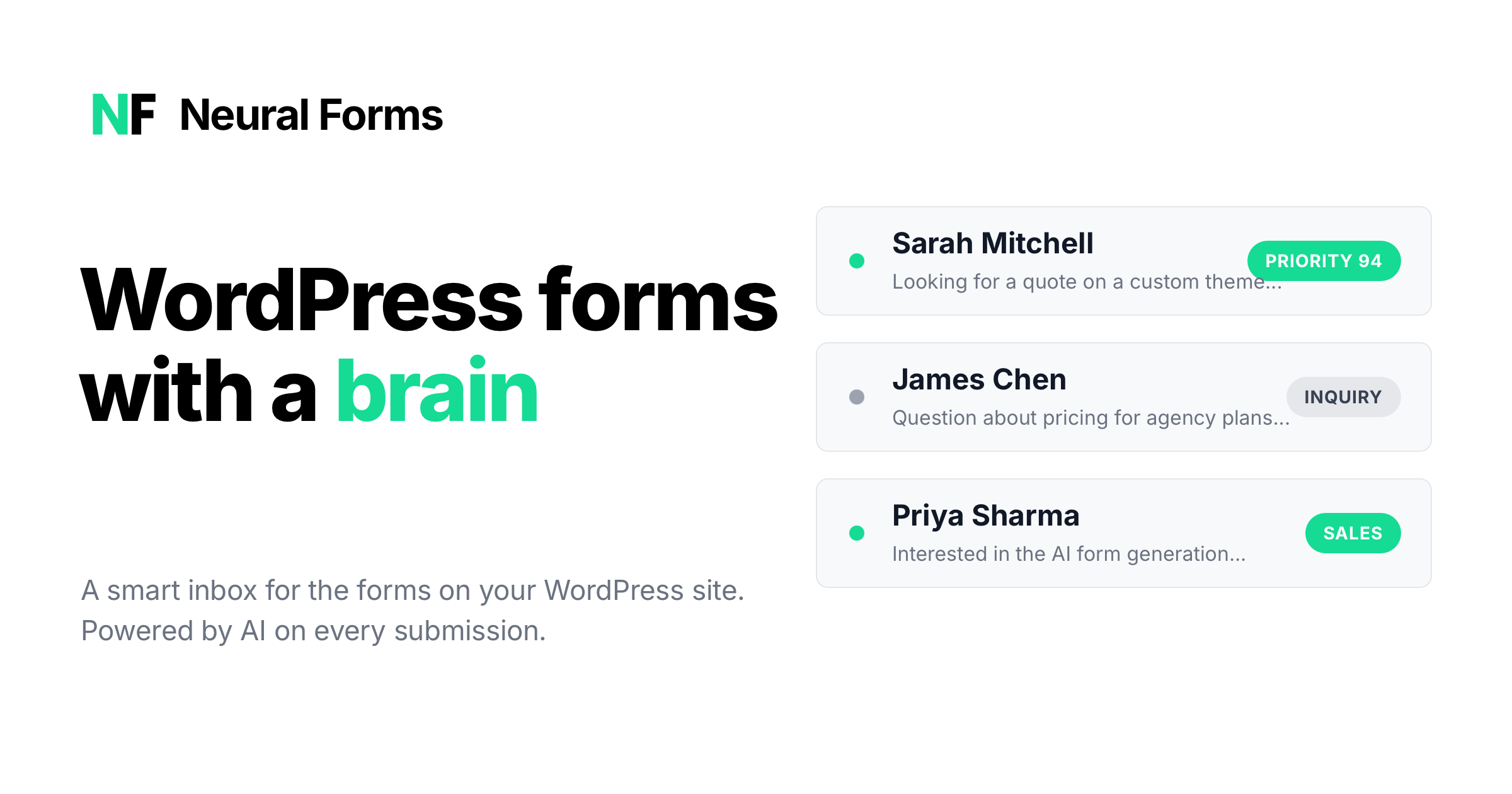
Neural Forms is built for that gap. It is a WordPress plugin with a visual form builder, an email-style lead inbox inside wp-admin, and hosted Neural Forms AI that analyzes each entry as it arrives—summary, category, priority score, spam signal, and a draft reply you can edit and send. The product is from Elicus, a WordPress plugin shop active since 2015; Neural Forms itself is still early on WordPress.org.
This Neural Forms review is based on the public site (Features, Pricing, Documentation, Demo templates, integration pages, and the Neural Forms AI page), plus the Launchpadly listing. We did not run a production agency fleet or score AI reply quality against a human support team.
Disclosure: Independent Launchpadly editorial—not a sponsored endorsement. Plans, credit pools, and feature gates change; confirm on the live site and in a staging install before you buy.
Key takeaways
- Neural Forms is a WordPress form plugin with three pillars: drag-and-drop builder, lead inbox, and hosted Neural AI on submissions.
- Lite is free: builder, inbox, 18 field types, CF7 migration, and 100 lifetime AI credits (no card to try AI).
- Paid plans are annual and cover unlimited sites: Starter $99/year (7,500 AI credits) and Agency $199/year (25,000 AI credits), with never-expiring top-up packs.
- Pro unlocks AI form generation, smart spam controls, Divi 5 module, premium AI tiers, polish/regenerate, site profile scraping, and integrations (HubSpot, Mailchimp, Zapier, WhatsApp, Google Forms).
- Best fit: sites that treat submissions as work to triage. Weaker fit: bare contact forms you never open, or deep Gravity Forms / WPForms stacks you will not rip out.
What is Neural Forms?
Neural Forms installs like any WordPress plugin and adds a Neural Forms menu in wp-admin. Public positioning—“WordPress forms with a brain”—maps to three jobs:
- Build forms visually (Gutenberg block, shortcode, or Pro Divi 5 module).
- Collect every submission in a first-party inbox instead of relying on email alone.
- Assist with hosted AI (API key from neuralforms.ai) that summarizes entries and drafts replies.
It is not a hosted form SaaS like Typeform. Entries live in your WordPress database; AI processing runs through Neural Forms’ hosted service when enabled. Documentation frames the product as turning contact forms into an AI-powered lead management layer on top of WP—not a full CRM.
If you wanted a Neural Forms review, an AI WordPress form plugin, or a Contact Form 7 alternative with inbox + drafts, that builder → inbox → AI loop is the whole thesis.
First impressions
The marketing site is unusually clear for a plugin launch: builder, inbox, and AI pipeline are explained as a sequence, and Lite vs Pro gates are named (AI form generation is Starter/Agency, not Lite). Pricing is annual, unlimited-site, and credit-metered for AI—easy to model once you know monthly submission volume.
Demo templates on neuralforms.ai/demo show contact, multi-step registration, feedback with ratings, job application with resume upload, booking, and newsletter patterns. That is useful: you can judge field UX before installing.
On WordPress.org, Lite existed under Elicus with a very small active-install count when we checked (fewer than 10). Read that as new product, experienced vendor—pilot on staging, do not assume a decade of third-party tutorials overnight.
Evaluation methodology
Sources for this review:
- Homepage, Features, Pricing, Documentation quick start, Demo templates
- Neural Forms AI page and HubSpot integration page (as a depth check on Pro connectors)
- Launchpadly listing copy and screenshots
- WordPress.org directory entry for Neural Forms Lite
We did not mystery-shop every Zapier recipe, measure AI latency under load, or treat “Privacy mode (GDPR)” as a completed compliance program. Credit guidance (“one submission ≈ one credit” on the user-facing side) is vendor-published, not our lab measurement.
Product overview
Published path after someone hits Submit:
- Entry is validated, sanitized, and stored in WordPress.
- Admin notification and visitor autoresponder can fire (tokens supported).
- If AI is connected and credits remain: summary, category, priority (0–100), spam classification.
- A context-aware reply draft is generated; Pro workflows emphasize carousel drafts, regenerate, and polish.
- The entry shows in the lead inbox for star/status/spam, human edit, and send—with thread history when you reply from the inbox.
- Optional Pro integrations push the lead outward (for example HubSpot create/update with per-entry sync status).
The product bet is simple: the inbox is the work surface; AI is the first-pass analyst so humans start mid-reply, not from a blank email.
Key features
Drag-and-drop form builder
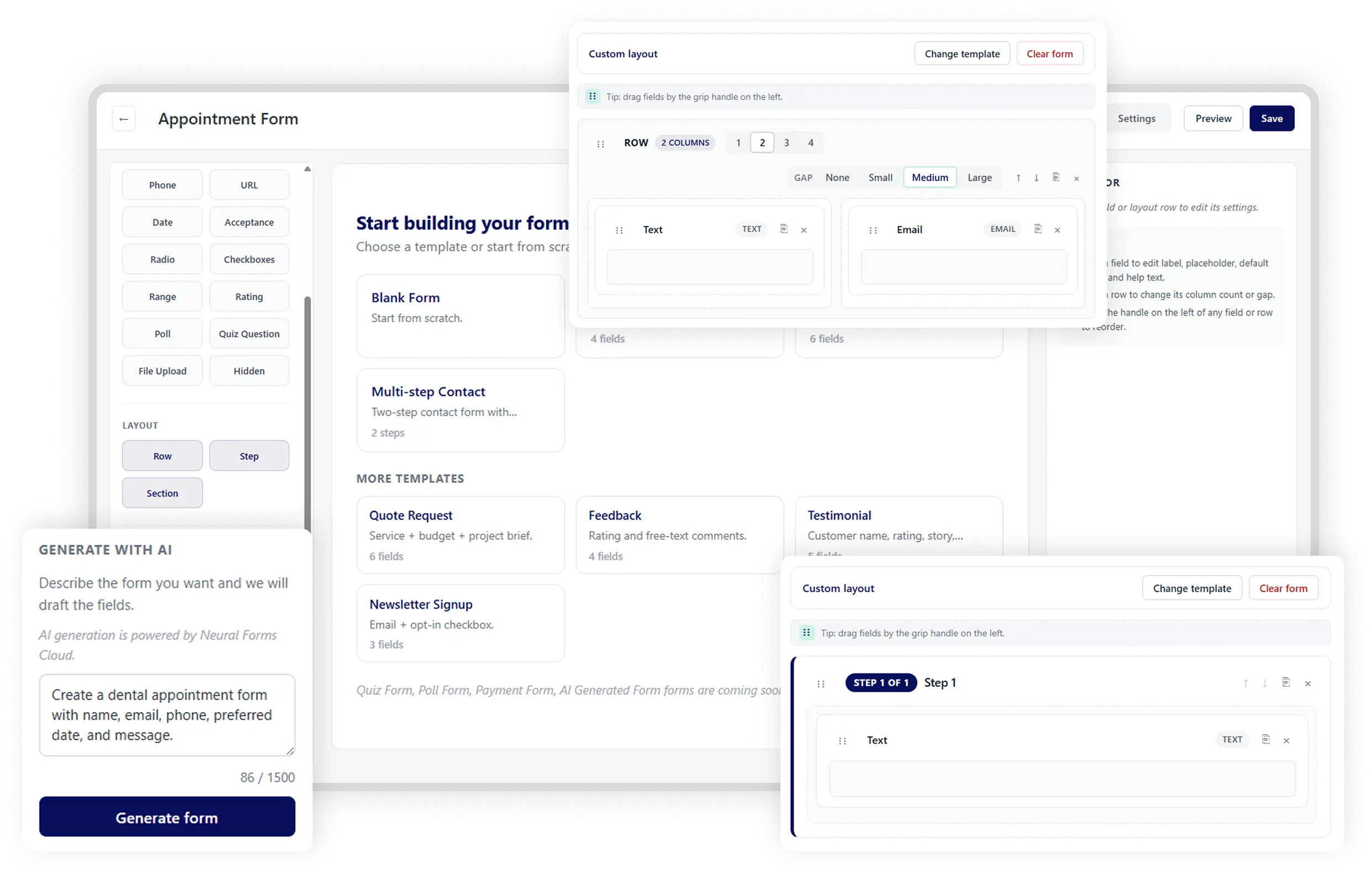
Lite ships a canvas with live desktop/mobile preview and 18 field types: text, email, textarea, select, checkbox, number, phone, URL, date, acceptance, radio, checkboxes, range, poll, quiz, file upload, hidden, and rating. You get row/column layouts (1–4 columns, responsive), validations (required, length, patterns, custom errors), one-click templates, and quiz/poll modes with results tracking. Homepage copy also mentions conditional logic alongside uploads and CAPTCHA—confirm the exact conditional depth in the builder for your forms.
Multi-step forms get their own feature page: Step layout blocks, progress indicators (numbers, bar, or none), Previous/Next labels configurable per embed, per-step validation, and unlimited reorderable steps. That matches the demo registration, job application, and booking templates—long forms without a single terrifying scroll.
Pro adds Matrix and Repeater fields (pricing comparison) and AI form generation: describe the form in plain English; get fields, labels, validations, and layout, then edit in the builder. Embed via Gutenberg block (docs recommend this), shortcode, or—on Pro—the native Divi 5 Visual Builder module.
Docs note that importing a template can auto-create a draft WordPress page with the form embedded—a small but real onboarding speedup.
Contact Form 7 migration
Lite and marketing both advertise one-click CF7 migration that maps fields and imports structure. That is the right switch for teams stuck in CF7’s “email dump” workflow who want an inbox without rebuilding every form. Edge cases (heavy CF7 add-ons, unusual conditionals) still need a post-import checklist—migration tools rarely catch everything.
Lead inbox inside WordPress
Submissions land in an email-style inbox: star, read/unread, spam, trash, bulk actions, search/filter by form and status, CSV export with date/status filters, and direct email replies with saved thread history. Features also describe dashboard stats (totals, new submissions, AI processing overview) and conversion/drop-off style insights—useful ops visibility, not a full product-analytics suite.
For a two-person shop, this alone can beat “search Gmail for last Tuesday’s quote.” For an agency, the inbox becomes the shared queue instead of a fragile shared mailbox.
Neural AI on every submission
With a free API key from neuralforms.ai (paste under Neural Forms → Settings → AI → Test Connection):
- Entry analysis: one–two sentence summary; category (sales, support, inquiry, complaint, spam, other); priority 0–100; spam scoring
- Auto-draft replies using submission content plus site context
- Reply draft carousel, reanalyze, regenerate (Pro emphasis)
- Polish and refine your own draft (Starter+)
- Smart spam detection with threshold slider 60–100; suggest or auto-move; can suppress notifications for flagged spam (Starter+)
- Site profile scraper (monthly homepage/key-page scrape for brand/tone—Starter+)
- Multi-tier models: Fast tier on Lite; premium tiers on paid plans
- AI processing dashboard: credits used/remaining, queue health, per-form activity
You do not paste an OpenAI key for the standard path. Neural Forms hosts routing and credit accounting. That convenience is also the tradeoff: submission text leaves your server when AI runs. Disable AI on forms that must stay local-only (medical, legal, highly confidential hiring).
Integrations and API (Pro)
Listed connectors: HubSpot, Mailchimp, Zapier, WhatsApp, Google Forms. Pricing also lists a REST API with 13 endpoints.
The HubSpot page is more specific than a logo wall: Private App token (encrypted in WP), auto-map by label/type, create-or-update by email (dedupe), required-property warnings, per-entry sync status with error messages, per-form enablement, custom property mapping, works with HubSpot Free CRM tiers. That is the depth bar we want from every connector—confirm Mailchimp/Zapier/WhatsApp the same way before promising sales automation.
Security and privacy knobs (as published)
CAPTCHA options include Cloudflare Turnstile and reCAPTCHA. Pricing lists Privacy mode (GDPR). Autoresponders support tokens. Still your job: keep WordPress and the plugin updated, harden the host, and decide which forms may call hosted AI.
Getting started
Documentation’s path is concrete:
- Install from Plugins → Add New (search “Neural Forms”) or upload the zip; activate; open the Neural Forms menu.
- Create from a template (import can create a draft page) or Add New in the visual builder.
- Configure field settings, notifications, confirmation messages, CAPTCHA.
- Embed with the Neural Forms block (recommended), shortcode, or Divi 5 module on Pro.
- For AI: create an account at neuralforms.ai, generate an API key (100 credits), paste into Settings → AI, test connection, submit a sample entry.
Marketing claims “15 minutes to first form” and “contact form in 60 seconds.” Believable for Demo 01–style contact forms. Budget real time for multi-step job applications, HubSpot mapping, and spam threshold tuning.
Who should use it
- WordPress operators who get enough quotes, support tickets, applications, or bookings that triage is a daily chore.
- Agencies that want unlimited-site licensing and a shared AI credit pool (model Agency’s 25k credits against client volume).
- Divi 5 builders who want forms inside the Visual Builder without shortcode sprawl (Pro).
- Teams leaving Contact Form 7 who want migration help plus an inbox—not another email-only plugin.
- Operators who want AI draft replies without wiring custom GPT scripts into WordPress.
Who should avoid it
- Sites with a tiny contact form nobody works from wp-admin—Lite AI credits will idle; a simpler plugin may be enough.
- Teams locked into Gravity Forms / WPForms with payments, deep add-ons, and trained staff—switching cost can erase AI gains.
- Buyers who need fully on-prem / offline LLM analysis of every submission. Neural AI is hosted by design.
- Workflows that cannot send form content to a vendor AI without a signed DPA and security review—talk to Elicus before enabling AI on sensitive forms.
- Anyone expecting a million-install mature plugin with years of Stack Overflow answers. Public install count was still tiny when we checked.
Pricing and value
Published at neuralforms.ai/pricing at review time. Paid plans: unlimited websites, 30-day money-back.
| Plan | Price | Published highlights |
|---|---|---|
| Lite | $0 forever | Builder, 18 fields, lead inbox, Gutenberg/shortcode, quiz/poll, CF7 migration, CAPTCHA, notifications, Fast-tier AI + auto-draft with 100 lifetime credits |
| Starter | $99/year | Lite + 7,500 AI credits/year, AI form generation, smart spam, reanalyze/regenerate, polish, site profile scraper, Divi 5, premium AI tiers, Pro integrations, unlimited poll submissions, priority support, auto updates |
| Agency | $199/year | Starter + 25,000 AI credits/year |
| Enterprise | Custom | Custom credits/models, dedicated AM, custom integrations, onboarding, invoice billing, white-glove support |
Credit top-ups (paid plans only):
| Pack | Price | Credits |
|---|---|---|
| Starter Credit Pack | $19 | 2,000 (never expire) |
| Growth Credit Pack | $49 | 10,000 (never expire) |
Rules that affect real budgets:
- User-facing rule of thumb: one submission ≈ one AI credit.
- Lite’s 100 credits are one-time lifetime; then AI pauses, builder/inbox continue.
- Annual credits reset on renewal and do not roll over; pack credits never expire and burn after annual credits.
- Packs require an active paid plan—Lite users must upgrade to keep AI after 100.
- Non-renewal: forms and inbox keep working; you lose AI credits, updates, patches, and priority support.
Rough credit math: Starter’s 7,500 credits ≈ ~20 AI-analyzed submissions/day if you AI-process everything year-round. Agency’s 25,000 ≈ ~68/day. Many sites AI-analyze only sales/support forms and leave newsletter signups offline—stretch the pool. A spam wave without CAPTCHA/thresholds will burn credits; treat spam controls as cost controls.
Value read: $99/year unlimited sites is aggressive if drafts meaningfully cut reply time. Agency is mostly a larger meter for agencies and busy properties. Compare to Gravity Forms license math plus a helpdesk seat: Neural Forms is cheaper on paper when humans mostly edit AI drafts instead of writing cold.

Pros and cons
Pros
- Clear thesis: builder + inbox + AI, not another field palette alone
- Honest Lite tier with a real inbox and a free AI trial pool
- Transparent annual pricing, unlimited sites, top-up packs, 30-day refund
- Practical AI outputs: summary, category, priority, spam, draft reply
- Multi-step builder and demo templates match real lead/job/booking flows
- CF7 migration and Divi 5 module lower switching friction
- HubSpot page shows serious connector thinking (dedupe, sync status, per-form toggle)
Cons
- Very early WordPress.org traction—pilot before betting a large fleet
- AI depends on hosted credits/API—not a local-model path
- Annual credits do not roll over; busy months may need packs
- Niche premium form needs (complex payments, huge add-on catalogs) may still favor incumbents—confirm must-haves
- Homepage “thousands of professionals” style claims should be weighed against tiny public install counts
- Sensitive forms need an explicit AI on/off policy
Comparison: Neural Forms vs common alternatives
| Capability | Neural Forms | Contact Form 7 | Gravity Forms / WPForms-class |
|---|---|---|---|
| Visual builder | Yes | Limited / add-ons | Yes (strong) |
| Built-in lead inbox + reply threads | Yes (core) | No (email/DB plugins) | Entries UI (varies; rarely “AI draft”) |
| AI summary + draft reply | Yes (hosted credits) | DIY | DIY / third-party |
| Multi-step + progress UX | Yes (core) | Add-ons | Yes |
| CF7 migration | Yes (published) | n/a | Varies |
| Divi 5 native module | Yes (Pro) | Shortcodes | Varies |
| Mature add-on catalog | Early | Huge | Huge |
| Starter price shape | $0 / $99–$199 yr unlimited sites | Free + paid add-ons | Often per-site or tiered |
CF7 wins when free + familiar is enough and email is acceptable. Gravity Forms / WPForms win when you need a battle-tested add-on catalog and payments complexity. Neural Forms wins when the missing piece is inbox + AI first pass, and you will accept a newer plugin from a long-running WordPress shop (Elicus).
Against Typeform-style SaaS: wrong comparison category. Typeform hosts forms off-WordPress; Neural Forms keeps entries on your site and optionally sends content to hosted AI.
Real use cases
- Quote / lead sites: Multi-step quote → inbox priority → edit AI draft → send; HubSpot sync on Pro with per-entry status.
- Hiring: Job application with resume upload (demo template exists) → AI quick read → star shortlist; keep AI off if resumes cannot leave your server.
- Support contact: Turnstile/reCAPTCHA + smart spam thresholds → fewer junk pings → draft replies for common questions.
- Agency multi-site: One Starter/Agency license across clients; track shared credit burn in the AI dashboard.
- Divi agency builds: Style forms inside Divi 5 without leaving the page canvas.
- Light surveys/quizzes: Built-in poll/quiz modes and results—not a research-grade survey platform, but enough for many WP sites.
- CF7 escape hatch: Migrate fields, turn on inbox, run 100 Lite AI credits as a proof before Starter.
Suggested pilot plan (two weeks)
- Week 0: Staging install of Lite; recreate one high-value form (or CF7-migrate); embed on a draft page.
- Days 1–3: Submit 20–30 realistic test entries; judge summary quality and draft tone with Fast-tier AI.
- Days 4–7: Enable CAPTCHA; tune spam threshold in suggest mode; decide which forms may use AI.
- Days 8–14 (Pro trial mindset): If drafts help, buy Starter under the 30-day refund window; map HubSpot or Zapier on one form only; watch credit burn for a week of real traffic.
- Go / no-go: Keep if staff start from AI drafts and the inbox replaces shared email. Refund/revert if drafts need full rewrites or must-have builder features are missing.
Limitations and honesty checks
- Early install base. New plugins move fast—and can break workflows. Staging + backups are non-negotiable.
- AI quality follows form design. Vague open text yields vague summaries; structured fields help.
- Credits are a meter. Campaigns and spam burn the pool; CAPTCHA + thresholds are budget tools.
- Hosted AI data path. Know what leaves the server; disable AI where policy forbids it.
- Not a full CRM. Stars and status help; forecasting still belongs in HubSpot (or similar).
- Marketing vs directory stats. Trust your trial more than crowd claims on the homepage.
- Payments and exotic logic. If checkout-inside-form is mandatory, verify before migrating a revenue form.
Editorial ratings
Scores reflect published fit for WordPress lead triage—not a support-volume lab test. Inbox/integrations sits at 7 until more connectors match HubSpot’s documented depth in public pages.
| Category | Score |
|---|---|
| Ease of use | 8/10 |
| Value for money | 8/10 |
| Neural AI depth | 8/10 |
| Inbox & integrations | 7/10 |
| Form builder depth | 8/10 |
| Overall | 7.8/10 |
Verdict
Neural Forms is a coherent answer to a real WordPress pain: forms that create work, not just emails. The builder covers the forms most sites actually ship (including multi-step), the inbox is the right second act, and Neural AI’s summary-plus-draft loop is the differentiator—especially at $99/year unlimited sites if drafts match your tone well enough that humans edit instead of rewrite.
Buy Starter (or start Lite) if you run WordPress, get regular submissions, and want AI-assisted triage without standing up a separate ticket tool on day one.
Choose Agency if AI-analyzed volume across sites will clearly exceed ~7,500/year.
Skip if you need a mature mega-catalog form plugin, fully on-prem AI, or you never work submissions inside WordPress.
Independent site owners should burn the 100 Lite credits on real entries this week. Agencies should run the two-week pilot above under the 30-day refund window before rolling a client fleet.
Bottom line: Neural Forms is one of the clearer “form plugin → lead workspace” bets in WordPress right now—worth a Lite install and an honest submission test before you renew another year of CF7 add-ons and inbox archaeology.
FAQ
What is Neural Forms best for?
WordPress sites that need a form builder, a lead inbox, and optional AI analysis/draft replies—so the first triage pass happens in wp-admin instead of a shared mailbox.
How much does Neural Forms cost?
At review time: Lite $0; Starter $99/year (7,500 AI credits); Agency $199/year (25,000 AI credits); Enterprise custom. Packs $19 / 2,000 and $49 / 10,000. See pricing.
Is there a free version?
Yes. Neural Forms Lite on WordPress.org includes the builder, inbox, and 100 lifetime AI credits. AI pauses when those are gone; forms and inbox continue.
Do I need my own OpenAI API key?
No. The standard path uses a Neural Forms API key with hosted model routing and credit management.
Can I migrate from Contact Form 7?
Yes—the site advertises one-click CF7 migration for fields/structure. Re-test complex forms after import.
Does one license cover multiple sites?
Yes. Public pricing FAQ states Lite and paid plans cover unlimited websites with no per-site activation limit.
What happens if I don’t renew?
Builder, inbox, and existing forms keep working. You lose ongoing AI credits, updates, security patches, and priority support.
How do multi-step forms work?
You add Step layout blocks, choose progress indicators, customize Previous/Next labels, and rely on per-step validation. Embed with the multi-step-aware block, shortcode, or Divi 5 module.
How deep is the HubSpot integration?
Pro docs describe Private App tokens, auto-mapping, create-or-update by email, required-property warnings, per-entry sync status, per-form toggles, and custom properties—including HubSpot’s free CRM tier via the standard CRM API.
Is Neural Forms a Typeform alternative?
Only loosely. Typeform is hosted SaaS. Neural Forms is a WordPress plugin with on-site storage and optional hosted AI. Compare it first to CF7, WPForms, and Gravity Forms.
Similar products on Launchpadly
 CostLoop
 Launch Auditor
 Root HR
More SaaS reviews

SaaS
Melaya Review: Governed AI Agents for Tools, Browser & Android (2026)
Melaya is a multi-product AI agent platform—Agents, Assistant, Device Control, Browser Control, MCP,…

SaaS
StopReg Review: Disposable Email & Signup Abuse Detection API (2026)
StopReg is a real-time email intelligence API for blocking disposable, relay/alias, role-based, and…

SaaS
GuestsMadeSimple Review: Podcast Guest Booking Software (2026)
GuestsMadeSimple is podcast guest management software with intake forms, scheduling, prep pages, and…

SaaS
BasinCheck Review: Oilfield Safety Audit Software for Contractors (2026)
BasinCheck is oilfield-focused safety audit software with offline inspections, JSA builder, OSHA 300…