xEVE.ai Review: Video-First AI Companion Platform (2026)
XEVE.ai (Xeve) is an 18+ adult AI companion platform with live video chat, image/video generation, and custom characters—not text-only chat. Review of…

Reviewing xEVE.ai · Published · 16 min read
Opening
Most AI companion products still end at a chat box. You type, the model replies, and any “presence” is a static avatar or a still image. That works if you only want dialogue. It falls short if you want a session that looks and moves more like a video call—lip sync, gestures, and reactions that respond inside a running video experience rather than only as text.
xEVE.ai (also styled Xeve / Xeve.ai) positions itself as a video-first AI companion platform. On Launchpadly it is listed under AI & Machine Learning, built with Vue.js, with the tagline “Video first AI companion platform.” The listing about describes a product for chat, video call, and generating custom scenes with any of 16 characters, or building your own—emphasizing real-time video and voice, not text alone. On Launchpadly it appears in the Homepage Featured & Premium band as ★ Premium, was listed 2026-08-14, and is scheduled for the week 34 / 2026 board (not yet in the current-week feed at the time of this review).
Age and audience (stated once): Xeve.ai is an adult AI companion platform. Access is intended for adults only; published safety docs point users to age-related controls, youth-protection references, Privacy Policy, Terms, and Complaints. This review stays professional and non-explicit. Anyone under the site’s age rules—or uncomfortable with adult companion products—should stop here and skip the product.
This review is based on live product documentation at xeve.ai/docs/what-is-xeve-ai, pricing, live video, generation, character, safety, and FAQ docs, the public homepage, and the Launchpadly listing. We did not run a long-term paid production soak or score every character’s video quality under lab conditions.
Disclosure: Independent Launchpadly editorial content for a Premium listing—not a sponsored endorsement. Membership prices, credit costs, character counts, and feature gates can change by region and over time; confirm at checkout and in current docs before you buy.
Key takeaways
- Xeve.ai is a multi-flow companion platform: character browsing, live AI video chat (lip sync, gestures, action-based responses), image/video generation, and custom character creation—not a single text chatbox.
- Published differentiator vs text-only apps (Character.AI-style and similar): interaction extends into live video and generated media on a web-based product.
- Pricing splits cleanly in docs: memberships unlock broader companion access; credits fund generation. All-access membership is about $12.99/mo, quarterly ~$6.29/mo equivalent, yearly ~$4.89/mo equivalent, with a monthly generation credit allowance included. Credit packs start at $4.99; example costs are 5 credits per image, 20 per video; $22.99 for 500 credits ≈ 100 images or 25 videos. Checkout can vary by region.
- Company behind the product: Jay Web Development & Services, Olching, Germany (published on site footer and trust pages).
- Best for adults who want video presence + generation in one browser product. Weaker fit for users who only want free unlimited text chat, or who need a mobile-native app first.
What is xEVE.ai?
Per What is xeve.ai?, Xeve.ai is an AI companion platform that combines conversational AI, interactive character pages, live AI video chat, and media generation. The main product is the interactive companion experience; blog, landing, and legal pages explain pieces of that product rather than replacing it.
Docs frame four connected areas:
- AI companion and character browsing — discover characters and start interactions.
- Live AI video chat — real-time sessions with lip sync, gestures, and action-based responses.
- Image and video generation — create media from prompts, structured choices, or reference images.
- Custom character creation — build a character with chosen looks, voice, traits, and relationship style.
Most users start by choosing a character and opening her page, then chat, start a live video interaction, or move into generated media. Some stay with built-in characters; others personalize through custom characters or generation. Free entry points exist alongside paid access: some actions can be tried without paying, while premium video actions, longer usage, or generated media may require a subscription, credits, or both depending on the flow.
If you searched for an xEVE.ai review, a Xeve AI companion review, or a video AI girlfriend platform comparison, that four-area structure is the thesis—not “another chatbot with a wallpaper.”
First impressions
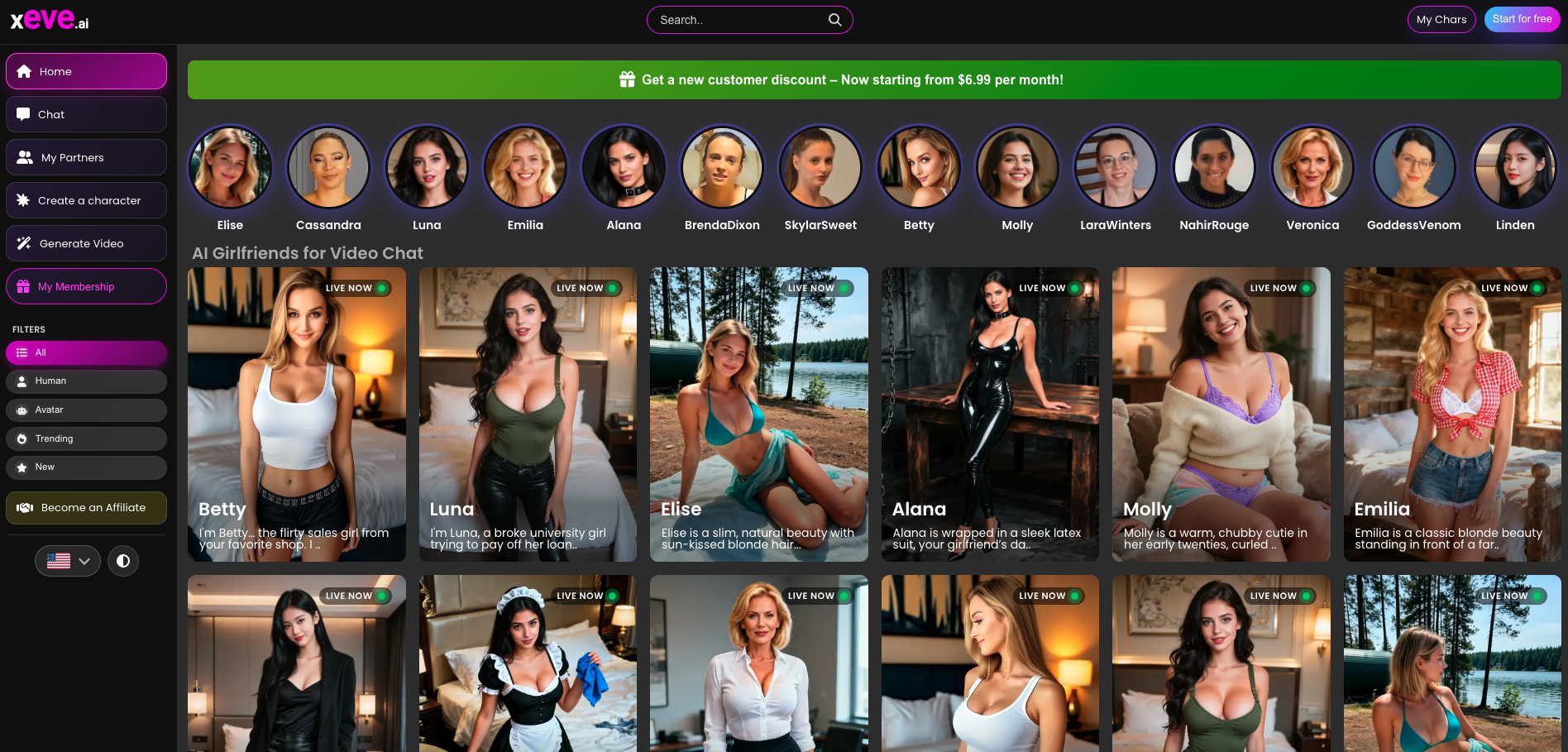
The live homepage presents a gallery of companion identities with chat/video-oriented entry points, plus generation-oriented character tiles and a FAQ block aimed at first-time visitors. Marketing language is consumer-facing and adult-positioned; the docs hub is where the product becomes clearer for buyers: stable explanations of live video, generation, memberships vs credits, characters, and safety routing.
Launchpadly packaging matches the site’s own pitch: video-first, AI/ML category, Vue.js stack, Premium placement. Week-34 scheduling means discovery on the weekly board is upcoming relative to listing date—not that the product site is unavailable today. Founders and users evaluating from Launchpadly should treat the listing as a discovery surface and the docs as the source of product truth.
Compared with text-only companion UIs, the first-session expectation should be higher friction and higher payoff: you are choosing a character identity, then deciding among chat, live video, and generate flows. That is intentional platform design, not a missing “one button does everything” simplification.
Evaluation methodology
Sources for this review:
- Live docs: What is xeve.ai?, How live AI video chat works, How image and video generation works, Custom character creation, Pricing: memberships vs credits, Characters and persona types, Safety, privacy, age rules, and moderation, How xeve.ai differs from text-only AI companions, FAQ and glossary
- Public homepage at xeve.ai
- Launchpadly listing: launchpadly.co/startup/xeveai (slug
xeveai)
We did not claim to measure every regional checkout price, every credit burn under heavy generation use, or video quality across all characters and network conditions. Where docs say offers can change, we treat published numbers as current examples, not forever guarantees.
Product overview
Character browsing and persona layer
Characters and persona types describes characters as companion identities users browse, open, chat with, watch, or build around. Persona traits cover personality, relationship style, look, interests, and actions. A character is more than a name or image: profile text, relationship framing, personality traits, tags, and—in custom flows—user configuration.
Standard characters form a browsable library across listing and profile pages, live video routes, and chat routes. The Launchpadly listing cites 16 characters for chat, video, and scene generation; the live site shows a gallery of named companions users can open. Treat “16” as the listing’s published count and confirm the current library size on the live character browse pages before assuming a fixed inventory.
Custom characters use a structured builder (origin, personality, age, look, relationship style, voice, work, hobbies, and related fields) rather than only a freeform prompt. After creation, that identity can feed later chat, video, and media flows.
Live AI video chat
How live AI video chat works defines “live” carefully: an interactive session where the character responds inside a running video experience, with real-time cues such as lip sync, gestures, facial expression changes, and action-based responses. It is not framed as a pre-recorded clip library alone. The interaction loop reacts to what the user does in the session.
Typical flow:
- Open a character page or live-chat entry page.
- Interact through chat and action controls.
- Receive video-form responses with speech and motion cues.
- Session tone follows character, page, and available actions.
Access and limits: some live interaction can be explored without paying; subscriptions and premium access unlock longer use, wider action sets, or more advanced interactions. Exact offers change—check the current product page or checkout.
This is the core contrast vs text-only companions: visible reactions instead of only written messages.
Image and video generation
How image and video generation works separates generation from live chat. Generation creates new image or video outputs from inputs; live chat is a real-time interaction flow.
The Generate page supports image and video modes. Depending on mode, users work from text, structured choices, or a reference image. Video can be guided by text or a selected image; image generation can use structured visual choices or a reference image. Controls cover appearance, clothing, scene, camera, mood, and related details. Reference images can anchor look from an existing character image or other supported sources.
Image vs video: video usually costs more credits and more processing; longer duration increases credit need further. Generation is primarily credits-based; the Generate page shows available vs required credits. Docs note temporary free entry conditions can apply (for example a first free image). Insufficient credits route users to credits checkout.
Custom character creation
Custom character creation is a guided multi-step builder, separate from live chat and from the generator—though users may combine them later. The app loads compatible actions based on earlier choices, shows a summary, then sends configuration to a creation endpoint.
Login and subscription rules: users must be logged in to create a character. The app checks subscription state before allowing additional custom characters; hitting a limit surfaces an upgrade path instead of completing creation. That ties custom creation to the membership layer described in pricing docs.
Access model in one sentence
Subscriptions generally unlock broader companion access; credits fund generation-heavy actions such as images or videos. Many users will use both.
Who should use it
- Adults who want a browser-based companion with live video, not only typed chat.
- Users comparing video companion apps who prefer a documented web product with clear membership vs credit split.
- People who want both ready-made characters and a structured custom builder.
- Creators of companion-adjacent media who will actually spend credits on image/video generation around a character.
- Launchpadly visitors evaluating Premium / Featured AI listings in week 34 / 2026 who care about video-first positioning in AI & Machine Learning.
Who should avoid it
- Anyone who does not meet the site’s adult age rules, or who does not want an adult companion product at all.
- Users who only want a simple text-only companion with one mode and no video or generation layer—text-only tools may fit better (Xeve’s own docs say so).
- Buyers who need a mature mobile-native app store experience as the primary surface; Xeve’s published story is web platform + docs, not a claim that native iOS/Android apps are the core.
- People unwilling to manage a two-meter budget (membership + credits) or who expect unlimited free generation.
- Users who treat AI companions as a substitute for professional mental-health care—this is a consumer entertainment/companionship product, not clinical software.
- Anyone who needs enterprise B2B features (SSO fleets, team workspaces, SOC reports as the product)—wrong category.
Pricing and value
Official framing lives at Pricing: memberships vs credits. Memberships and credits are related but not the same.
Memberships
Membership checkout is the recurring-plan side. Plan options include yearly, quarterly, and monthly access under the main all-access membership flow. Memberships unlock broader access to interactive character experiences and some subscription-gated capabilities.
Published standard all-access figures:
| Billing shape | Published figure |
|---|---|
| Monthly | $12.99 / month |
| Quarterly | ~$6.29 / month equivalent |
| Yearly | ~$4.89 / month equivalent |
Every membership includes a monthly allowance of generation credits. Regional prices and promotions can differ; checkout always shows the price that applies to you.
Credits
Credits are usage-based. Fixed packages sell on the credits checkout page; the app spends them on image and video generation. Video usually costs more than an image; longer duration can raise the requirement.
Current example from docs:
| Item | Published example |
|---|---|
| Image | 5 credits |
| Video | 20 credits |
| Pack example | $22.99 for 500 credits ≈ 100 images or 25 videos |
| Pack floor | Packages start at $4.99; no subscription required for credit packs |
How to choose
- Choose a membership for ongoing companion access.
- Choose credits to fund media generation.
- Use both if you live in live sessions and also generate media.
Value read: yearly membership (~$4.89/mo equivalent) is the efficient path for regular companion use; credit packs matter when generation volume exceeds the monthly membership allowance. Dual pricing is honest but easy to underestimate—model your likely mix of live sessions vs generated clips before comparing to a flat “unlimited” competitor claim.
Editorial ratings
Scores reflect Launchpadly editorial judgment from live docs and category fit—not an aggregated consumer star rating. We weighted published video + generation depth highly; we docked ease and value slightly for multi-flow complexity and dual meters.
| Category | Score |
|---|---|
| Getting started | 7/10 |
| Pricing value | 7/10 |
| Live video & AI depth | 8/10 |
| Character & generation tools | 7/10 |
| Platform depth | 8/10 |
| Overall | 7.4 / 10 |
Pros and cons
Pros
- Clear video-first product story backed by dedicated live-video docs, not only marketing slogans.
- Four connected product areas (browse, live video, generate, custom create) form a coherent platform, not a single chat mode.
- Transparent memberships vs credits explanation with concrete dollar and credit examples.
- Structured custom character builder with login/subscription rules stated in docs.
- Web-based access with a public docs hub suitable for due diligence.
- Company identity published: Jay Web Development & Services, Olching, Germany.
- Launchpadly Premium / Featured listing with explicit category and tech tags for discoverability.
Cons
- Two payment meters (membership + credits) raise total cost for heavy generators beyond the headline membership price.
- Offer surface changes—docs repeatedly say to check live checkout; buyers must re-verify prices and gates.
- Not the simplest product for users who only want text chat; multi-flow design is a learning cost.
- Independent long-term quality evidence (third-party longevity studies, large public review corpora) is thinner than for mega text-only brands—trial before annual commitment.
- Character library size and premium action sets are product-moving targets; do not treat any single marketing count as permanent without checking the live site.
How it compares
| Approach | What you get | When it fits |
|---|---|---|
| Xeve.ai | Text + live AI video + image/video generation + custom characters, web | Adults who want video presence and media creation in one product |
| Text-only companions (Character.AI-style and peers) | Conversation-first, often simpler UX | Users who never need live video or generation |
| Other video companion apps | Varying mobile vs web, quality, and pricing opacity | Compare session quality, age policy clarity, and published pricing honesty |
Xeve’s published differentiator (How xeve.ai differs from text-only AI companions): not limited to text; stronger character layer; live video-oriented and generated media flows; multi-flow platform structure. Text-only tools may fit better when the user wants fewer modes and no live or generated media.
Against other video companions, judge on: documentation clarity, membership vs credit honesty, browser accessibility, and whether “live” means interactive reaction loops (as Xeve docs define) vs clip playback. We do not invent competitor price tables here; run a same-week checkout comparison yourself.
Real use cases
- Video-first companion sessions: Pick a standard character, open live video chat, use action controls, stay in a real-time reaction loop rather than text-only messaging.
- Character exploration: Browse persona tags and profiles to find a fit before paying for longer premium access.
- Custom companion setup: Log in, complete the structured builder, then use that identity for later sessions; upgrade membership if custom-character limits apply.
- Scene and media generation: Spend credits on images (example 5 credits) or videos (example 20 credits) guided by text, choices, or reference images—separate from a live session.
- Hybrid use: Membership for companion access + credit packs when monthly allowance is not enough for generation volume.
- Due diligence via docs: Read safety, pricing, and “what is” pages before checkout—appropriate for adult platforms where policy routing matters.
Limitations and honesty checks
- Adult product. Skip if that category is not for you; follow site age, privacy, and moderation rules.
- “Live” ≠ human video call. Docs describe AI video responses with lip sync and gestures—not a claim of a real person on the other end.
- Generation ≠ live chat. Do not expect the generator to replace a real-time session or vice versa.
- Regional pricing. Published USD examples may not match your checkout.
- Free tier is exploratory. Longer use and advanced actions are gated; budget for membership and/or credits.
- Custom characters need login and may need subscription for additional creations.
- Listing schedule vs product availability. Week-34 Launchpadly board timing affects discovery ranking, not whether xeve.ai is online.
- Quality varies by character, network, and device. Editorial scores are not a frame-by-frame lab grade.
Verdict
Buy (for the right adult user) if you want a video-first, web-based AI companion with documented live video (lip sync, gestures, action responses), image/video generation, and custom character creation—and you accept membership plus optional credits as the cost of that stack. Start with free exploration where available, then choose yearly membership (~$4.89/mo equivalent published) if you will use companion access regularly; add credit packs only when generation volume justifies them.
Skip if you want text-only simplicity, refuse adult companion products, need clinical or enterprise tooling, or will not pay past a free chat tease. In those cases a text-only companion—or no companion product at all—is the better call.
Bottom line: Xeve.ai’s public docs and Launchpadly Premium listing describe a coherent multi-flow adult companion platform whose honest differentiator is live video + generation on the web, not another text chatbot rebrand. At an overall 7.4/10, it earns a buy for adults who specifically want that video-first stack; it is a skip for everyone else.
FAQ
Is xEVE.ai only a text chatbot?
No. Docs state it includes text chat plus live video-oriented flows, generated image and video flows, and character-based product routes. See FAQ and glossary and What is xeve.ai?.
How much does xEVE.ai cost?
Published all-access membership: about $12.99/mo, quarterly ~$6.29/mo equivalent, yearly ~$4.89/mo equivalent, with monthly generation credit allowance included. Credit packages start at $4.99; example generation costs are 5 credits/image and 20 credits/video; $22.99 for 500 credits ≈ 100 images or 25 videos. Confirm your regional checkout.
What is the difference between memberships and credits?
Memberships unlock broader companion access on a recurring plan. Credits pay for generation-heavy actions (images/videos). Many users use both. Details: Pricing: memberships vs credits.
What does “live AI video chat” mean on Xeve?
An interactive session where the character responds inside a running video experience with cues such as lip sync, gestures, expression changes, and action-based responses—not only a library of pre-recorded clips. See How live AI video chat works.
Can I create my own character?
Yes, through a structured custom character builder (login required). Additional custom characters may require an active subscription when limits apply. See Custom character creation.
Who makes xEVE.ai?
Published company: Jay Web Development & Services, Daxerstr. 42a, 82140 Olching, Germany (site footer / company trust surfaces).
How does Xeve compare to Character.AI-style apps?
Text-only companions center conversation. Xeve adds a stronger character layer, live video-oriented flows, and image/video generation in a multi-flow web platform. Text-only may fit better if you never need video or generation.
Where is xEVE.ai on Launchpadly?
Slug xeveai: https://launchpadly.co/startup/xeveai. Category AI & Machine Learning; Vue.js; listed 2026-08-14; Premium/Featured band; scheduled for week 34 / 2026 board.
Similar products on Launchpadly
 subba
subba Spec27
 Word Studio
More AI & Machine Learning reviews

AI & Machine Learning
Make Yourself AI (myai) Review: Operations Context for Manufacturing Teams (2026)
Make Yourself AI’s myai platform turns planner and operator judgment—plus ERP, spreadsheets, and fil…

AI & Machine Learning
Inkwell Review: AI Screenwriting IDE with Version Control (2026)
Inkwell is AI-native screenwriting software (Plot) with save points, draft lines, inline AI skills,…

AI & Machine Learning
xPomelo Review: Conversational AI Search for Adult Video Discovery (2026)
XPomelo (chat.xpomelo.com) is a free, anonymous conversational search layer over 60M+ third-party ad…

AI & Machine Learning
ContentPod Review: Voice-First AI Content Engine for Creators (2026)
ContentPod turns one guided voice interview into linked drafts for blog, social, email, FAQ, and vid…