Inkwell Review: AI Screenwriting IDE with Version Control (2026)
Inkwell is AI-native screenwriting software (Plot) with save points, draft lines, inline AI skills, and Agent Mode—plus Canvas early access for long-form docs.…

Reviewing Inkwell · Published · 7 min read
Opening
Most screenwriting apps still behave like a fancy typewriter: industry formatting, maybe cloud sync, and a folder of FINAL_v3_REAL.fdx files when notes land. AI usually shows up as a chat panel that dumps suggestions you paste back by hand.
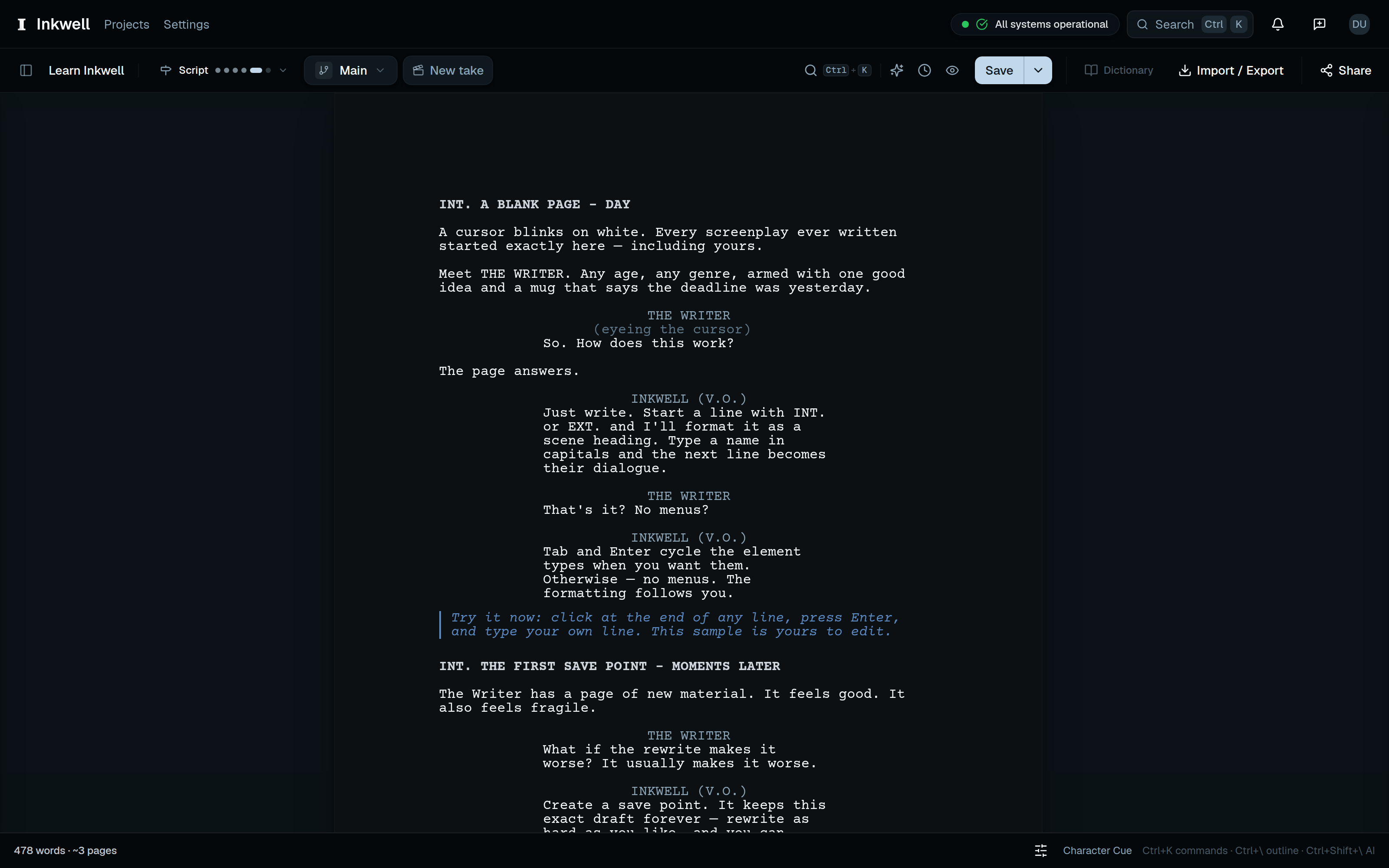
Inkwell calls itself an IDE for writers—version control, structured scene data, and agentic AI that proposes line-level changes you accept or reject. Plot is the screenplay product; Canvas is a separate long-form editor in early access for Pro and Team.
On Launchpadly: AI category, tagline AI-native screenwriting software with version control, stack Next.js / Tailwind / Turso / Vercel / Tauri, ★ Premium since 2026-09-12 (week 37 / 2026), founder Morgan Titcher.
Sources: live site, pricing, help quotas, FAQ, About, and that listing—not a multi-week writers’-room soak.
Disclosure: Independent Launchpadly editorial for a Premium listing—not a sponsored endorsement. Plan limits, model menus, and Canvas availability change; confirm on inkwell.software before you buy.
Key takeaways
- Wedge is structured drafts + version control + reviewable AI—save points, draft lines, and skill passes on specific lines, not paste-back chat.
- Plot is generally available; Canvas is early access / beta for Pro and Team.
- Self-serve pricing (Sept 2026): Free $0, Writer $19/mo, Pro $39/mo, Team $39/seat/mo, plus Enterprise custom.
- Free: full editor, save points, 20 skill passes/month, PDF + Fountain—no FDX until Writer. Pro unlocks stronger hosted models (Sonnet/Opus per vendor), Takes, WGA production tools, and up to 5 collaborators.
- Vendor FAQ: you own your scripts; AI does not overwrite without accept/reject; BYOK (Anthropic or OpenAI) skips hosted AI allowances.
- Strong if you hate
_FINAL_v4folders; weaker if you need offline Final Draft–style desktop as day-one primary (desktop still in progress on About).
What is Inkwell?
Plot is a browser screenplay editor that treats the script as structured data—scene headings, action, character, dialogue, and related elements (demos show Tab cycling 16 element types). Marketing stresses portable Fountain / plain text.
Core primitives: save points (named snapshots), draft lines (parallel full-script versions), semantic diffs, skills / Agent Mode (reviewable craft passes), and Pro+ production (locked pages, WGA colors, A-pages, breakdowns). Canvas shares the same substrate for Markdown long-form (24+ block types claimed)—evaluate Plot first for screenplays.
Evaluation methodology
Sources: homepage, pricing, FAQ, About, Plot/Canvas pages; Plans and quotas; Models and plans; compare pages vs Final Draft, WriterDuet, Arc Studio Pro, Fade In, Celtx, Highland, Slugline; Launchpadly listing.
We did not run a paid Pro month in a network room or score dialogue-pass quality on a fixed corpus. Quotas and prices are vendor-published as of September 2026—confirm in Settings → Plan & usage and checkout.
Product overview
Typical Plot loop: draft (or import FDX/Fountain) → name save points → explore an ending on a draft line → run a skill (e.g. Dialogue) and accept/reject lines → on Pro+, lock, apply revision colors, export PDF/FDX.
Ghost text suggests the next phrase; Ask answers draft-grounded questions; Edit selection proposes alternatives; Agent Mode works a scene/act goal on a separate path—FAQ says it does not silently rewrite the main draft. About lists 23 skills live.
Ownership FAQ: you keep screenplays and history; Fountain/PDF on every plan; FDX from Writer up. Vendor: no training on your scripts; skills send scoped pass context.
Key features
Element-aware editor (outline, command palette, focus mode). Versions: save points, draft lines, Pro Takes. AI: ghost text, Ask, inline edit, skills, Agent Mode; Pro markets Sonnet/Opus hosted models; BYOK for Anthropic/OpenAI. Import FDX/Fountain; export PDF/Fountain on Free, FDX from Writer+. Pro collab up to 5 people; Team adds real-time rooms, workspaces, shared skills, audit log, free viewer seats. Production (Pro+): revision colors, locking, breakdowns—LIVE per About; scheduling/stripboards and desktop/iOS still roadmap.
Pricing and value
| Plan | Price | Notable unlocks |
|---|---|---|
| Free | $0 | Editor, save points, 2 projects, 2 draft lines, 20 skill runs/mo, PDF + Fountain |
| Writer | $19/mo | 10 projects, 10 draft lines, 200 skill runs/mo, FDX export |
| Pro | $39/mo | ~5× Writer AI quotas, Takes, custom skills, production, 5 collaborators, Canvas EA |
| Team | $39/seat/mo | Workspaces, real-time collab, pooled credits, priority support |
| Enterprise | Custom | SSO, deployment, API, SLA |
Quota highlights from help:
| Allowance | Free | Writer | Pro | Team |
|---|---|---|---|---|
| Projects | 2 | 10 | 50 | 200 |
| Skill runs / mo | 20 | 200 | 1,000 | 5,000 |
| Collaborators | 0 | 0 | 5 | 25 editors* |
*Team editor seats purchased; viewers/commenters get a free allowance (help). Skill runs reset 1st of month UTC; over-limit stops at Run (wait / credits / BYOK). Students/educators: 50% off Pro after beta via [email protected]. Free teaches Plot—it is not an FDX handoff plan.
How Inkwell compares
| Need | Lean Inkwell | Lean Final Draft / classic formatters |
|---|---|---|
| Named save points + draft lines | Explicit design | Often file copies |
| In-draft AI with accept/reject | Core pitch | Usually bolted on |
| Offline desktop-first | Browser now; desktop in progress | Mature desktop norms |
| Production markup | Pro+ live claims | Deep incumbency |
WriterDuet / Arc Studio win when multiplayer alone is the job. Choose Inkwell Team when you also want shared skills, audit logs, and the same AI/version model—and still plan FDX round-trip for rooms that demand Final Draft.
Who should use Inkwell
- Writers who iterate endings and need restoreable moments
- Small rooms that want attributed edits without
_vFINALfolders - Educators using accept/reject AI passes (discount path after beta)
- Fountain users who must still ship FDX (Writer+)
Who should avoid it
- Anyone needing battle-tested offline desktop as primary today
- Teams that need Canvas on Free/Writer now
- Buyers wanting fully automatic script generation with no review
- Formatting-only users who will never use AI, versions, or collab
- Procurement needing Enterprise SSO/SLA without sales
Editorial ratings
| Category | Score (/10) |
|---|---|
| Editor & onboarding | 8 |
| Pricing & free-tier value | 8 |
| Skills, Agent Mode & BYOK | 9 |
| Craft-pass automation | 7 |
| Production & platform depth | 8 |
Automation is 7 on purpose: the product refuses silent overwrites, so assists stay human-gated.
Pros and cons
Pros
- IDE metaphors (save points, draft lines, reviewable diffs) fit real rewrite chaos
- Real Free lane: formatting + 20 skill passes before paying
- Writer at $19 unlocks FDX without forcing Pro
- Line-tied AI with accept/reject; BYOK for heavy users
- Transparent help quotas, not only homepage bullets
- Production/WGA story on Pro, not only a formatter
Cons
- Canvas and native apps still maturing; browser Plot is the fair test
- Free caps frustrate mid-rewrite collaborators
- Hosted models and menus will shift—confirm in-product
- Scheduling/stripboards still roadmap
- Incumbent rooms may demand Final Draft regardless of Plot quality
Real use cases
Solo rewrite with FDX import + Dialogue/Continuity passes; alt endings on a draft line; Pro lock + revision colors + FDX export for an AD still on Final Draft.
Verdict
Inkwell fits writers who already think in versions and want AI that behaves like a careful notes pass. Buy if you want Plot’s save points, draft lines, and reviewable skills, with Free → Writer ($19) for FDX or Pro ($39) for production and stronger models. Skip if you need offline desktop-first tooling today, Canvas as your cheap primary novel IDE, or a hands-off “write my script” generator.
Start Free on real pages; upgrade to Writer when someone asks for .fdx; move to Pro for locking, Takes, or five-person collab.
FAQ
What is Inkwell best for?
Plot screenwriting with industry formatting, named version history, and accept/reject AI skill passes—plus optional Pro production workflows.
Does Inkwell replace Final Draft?
It can be primary and imports/exports FDX (export from Writer up). Many productions still expect Final Draft files—plan for round-trip.
Is there a free plan, and what are the hard limits?
Yes: editor, recent save points, 2 projects, 2 draft lines, 20 skill runs/month, PDF/Fountain. No FDX, collaborators, or production on Free (vendor pricing).
Can I use my own OpenAI or Anthropic key?
Yes. BYOK can bill your provider instead of hosted allowance; project and draft-line caps still apply.
When should I choose Pro over Writer?
Writer for FDX and higher solo AI quotas. Pro for Takes, custom skills, production tools, five collaborators, higher AI caps, and Canvas early access.
Similar products on Launchpadly
 subba
subba Spec27
 Word Studio
More AI & Machine Learning reviews

AI & Machine Learning
Make Yourself AI (myai) Review: Operations Context for Manufacturing Teams (2026)
Make Yourself AI’s myai platform turns planner and operator judgment—plus ERP, spreadsheets, and fil…

AI & Machine Learning
xPomelo Review: Conversational AI Search for Adult Video Discovery (2026)
XPomelo (chat.xpomelo.com) is a free, anonymous conversational search layer over 60M+ third-party ad…

AI & Machine Learning
ContentPod Review: Voice-First AI Content Engine for Creators (2026)
ContentPod turns one guided voice interview into linked drafts for blog, social, email, FAQ, and vid…
AI & Machine Learning
xEVE.ai Review: Video-First AI Companion Platform (2026)
XEVE.ai (Xeve) is an 18+ adult AI companion platform with live video chat, image/video generation, a…