CorvinOS Review: Self-Hosted Agentic OS for AI Organizations (2026)
CorvinOS is an Apache-2.0 self-hosted agentic OS with messenger bridges, multi-engine agents, Forge/AWP workflows, Agentic Compute, and…
Reviewing CorvinOS · Published · 18 min read
Opening
Most “AI agent” products are chat windows with plugins. Useful—until you need the same agent on Telegram and Slack, a hash-chained audit of every tool call, a way to work an 8 GB dataset without stuffing it into the context window, browser automation you can watch, and a deployment that stays on infrastructure you control.
CorvinOS is Corvin Labs’ answer: an open-source, self-hosted agentic operating system. On Launchpadly it sits in Open Source with the tagline that it is built for EU AI Act 2026 and GDPR compliance by architecture—strong language that deserves careful reading, not blind trust. This CorvinOS review sticks to what the public site, GitHub README, and published pricing actually claim: messaging bridges, pluggable engines, Forge and SkillForge, AWP workflows, Agentic Compute, the A2A mesh, the marketplace extension model, and the Free vs Member limits.
Disclosure: We independently evaluated CorvinOS using corvin-labs.com, the CorvinLabs/CorvinOS repository README and linked docs index, and the Launchpadly listing (including screenshots). This is editorial content on Launchpadly and is not a sponsored endorsement. We did not run a multi-week production soak, a penetration test, or a formal legal compliance audit. Where we discuss EU AI Act / GDPR topics below, we are describing vendor architecture claims—not issuing a certificate that your deployment is compliant.
Key takeaways
- CorvinOS is a self-hosted agentic OS under Apache-2.0: install locally, attach LLM engines, connect messengers, and drive work from chat, voice, or the web console.
- Core surfaces include personas, pluggable engines, AWP workflows, runtime Forge tools and SkillForge skills, RAG, Agentic Compute, an A2A mesh, browser control, and a hash-chained audit.
- Messaging bridges published on GitHub include Discord, Telegram, WhatsApp, Slack, Email, Microsoft Teams, and Signal—positioned as full control surfaces, not notification-only bots.
- Pricing is public: Free €0 (self-hosted with hard caps) and Member €10 / device / month (limits lifted); Enterprise is custom for governance and support.
- Best fit: teams that want to own the agent runtime. Weaker fit: buyers who want a fully managed hosted SaaS with zero ops, or a simple single-bot toy without platform complexity.
What is CorvinOS?
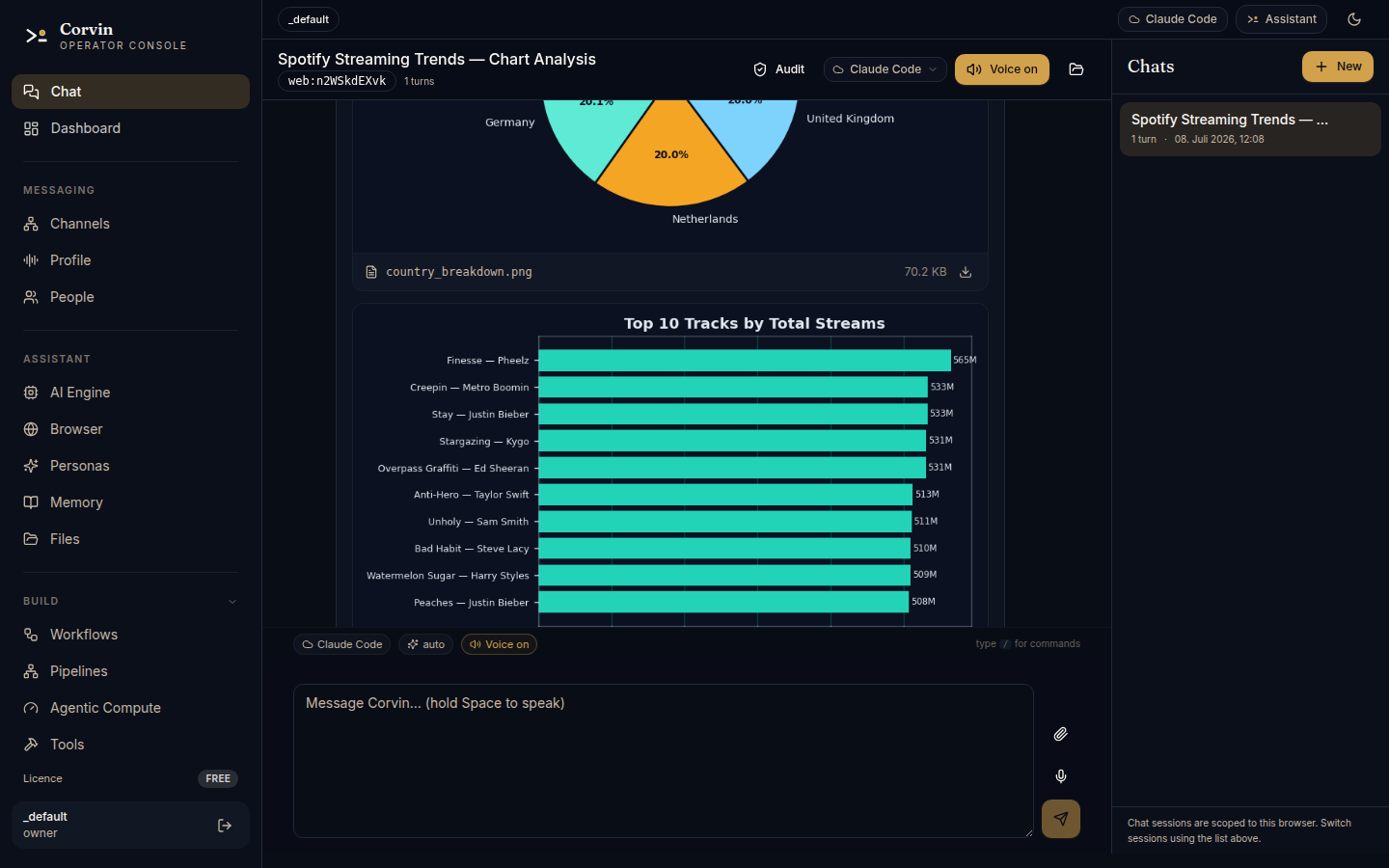
CorvinOS is software you run yourself. Corvin Labs frames it as the operating system for AI organizations—not a thin wrapper around one model vendor’s API. Per the README, one install connects engines such as Claude Code, Codex, Hermes/Ollama, OpenRouter models, and GitHub Copilot (via a WorkerEngine-style protocol) to multiple messengers through a shared runtime, with multi-tenant isolation for users, personas, and teams.
The marketing site emphasizes voice-to-action (speak → transcribe → route → act → speak back), a web console (default http://localhost:8765 in the README), Chromium browser control, and compliance mechanisms described as structural constraints rather than an optional “compliance mode” you can forget to enable.
If you searched for a CorvinOS review, a self-hosted AI agent platform, an agentic OS, or something mapped to EU AI Act / GDPR agent infrastructure, the short version: it is production-shaped agent infrastructure you host—closer to an OS than to a consumer chatbot.
First impressions
The homepage is dense and proudly technical. It sells an OS—engines, Forge, A2A, audit, compute—not a vague “copilot for work.” Install paths are concrete:
- macOS / Linux:
curl -fsSL https://corvin-labs.com/install.sh | sh - Windows: PowerShell
irm https://corvin-labs.com/install.ps1 | iex - Or, with Python 3.10+:
pip install corvinosthenpython -m corvinOS
The installer story (uv-managed Python, Hermes/Ollama for local-first start) lowers the “do I need a whole DevOps ritual?” barrier. Apache-2.0 and “self-host forever” are front-and-center, which is refreshing in a market full of hosted-only agent demos.
The tradeoff of that ambition is obvious from the page itself: this is a large surface area. Teams should budget learning time beyond a weekend trial. Expect to decide engines, bridges, personas, and data boundaries before the product feels “simple.”
Evaluation methodology
We reviewed the live marketing site (including the public Pricing block and platform/marketplace sections), the GitHub README quick start and feature summaries, and the Launchpadly listing materials. We did not claim to exhaust every bridge, every engine, every Forge path, or every Enterprise control. Where inventory of features is taken from marketing copy, we treat it as a published claim to verify in your environment—not as a guarantee of production readiness on day one.
Product overview
Published workflow in plain terms:
- Install CorvinOS on your infrastructure (installer script or pip).
- Attach one or more AI engines (cloud and/or local Hermes/Ollama).
- Connect messaging bridges and/or use the web console and voice.
- Run work through personas, workflows, Forge-generated tools, skills, RAG, browser control, and agentic compute—with events appending to an audit chain.
- Extend via the community marketplace / config-tree extensions, or unlock Member limits / talk to Corvin Labs for Enterprise governance.
That loop is the product. If you only need a single Slack bot with a fixed tool list, you can use CorvinOS—but you will be ignoring most of what it was built to do.
Key features
Chat and voice as the shell
A defining idea on the site: the chat is not a demo pane—it is the shell. Personas, engines, workflows, Forge, RAG, agentic compute, and A2A are reachable from one prompt. Voice-to-action extends that: speak a request from the console or a bridge; CorvinOS transcribes (local Whisper by default, with cloud fallbacks available), routes to a persona/engine, acts, and can speak the answer back. The site claims audio is deleted after transcription by default and that only metadata hits the audit chain—confirm that behavior matches your retention policy before you treat it as a privacy guarantee.
Messenger bridges as control surfaces
The README lists Discord, Telegram, WhatsApp, Slack, Email, Microsoft Teams, and Signal on one shared runtime—same session state, audit chain, and persona configuration. Marketing adds hot-reload settings, per-chat profiles, and rate limiting. Bridges are positioned as full control surfaces: you can run the OS from a Telegram or Signal thread without keeping the console open. That is a major differentiator versus “bot that only replies in one channel.”
Setup cost still exists. Each messenger has its own credentials, permissions, and failure modes. Budget time to harden the first bridge before you turn on six.
Pluggable engines
Engines plug in via a WorkerEngine-style protocol. Public materials call out Claude Code, Codex, OpenCode, Hermes (local Ollama), OpenRouter models, and GitHub Copilot. Adaptive Haiku/Sonnet-style selection is mentioned on the site. Local-first offline with Hermes is a first-class story—not an afterthought—which matters for air-gapped labs and egress-sensitive orgs.
In practice you will still pay for cloud engines when you choose them, and local model quality will bound what “fully offline” can do. CorvinOS is the runtime; the intelligence still comes from whatever engines you attach.
Forge, SkillForge, and AWP workflows
Forge generates schema-bound, sandboxed tools at runtime (docs mention bwrap isolation and MCP-callable tools, with a workspace hierarchy). SkillForge injects markdown skills into future turns, with grading, promotion gates, and an injection linter described on the site. Together they are the adaptation engine: a worker can create a tool mid-run and later workers can use it.
AWP workflows push the packaging story further. You describe an outcome in natural language; the run discovers an execution graph; you can save it as a repeatable workflow (including cron-style schedules in examples) and export logic, tools, skills, personas, and data bindings into a portable .awpkg (and related signed package concepts on the marketplace side). That is closer to an OS + packaging model than to a single chat plugin.
Agentic Compute and the data firewall
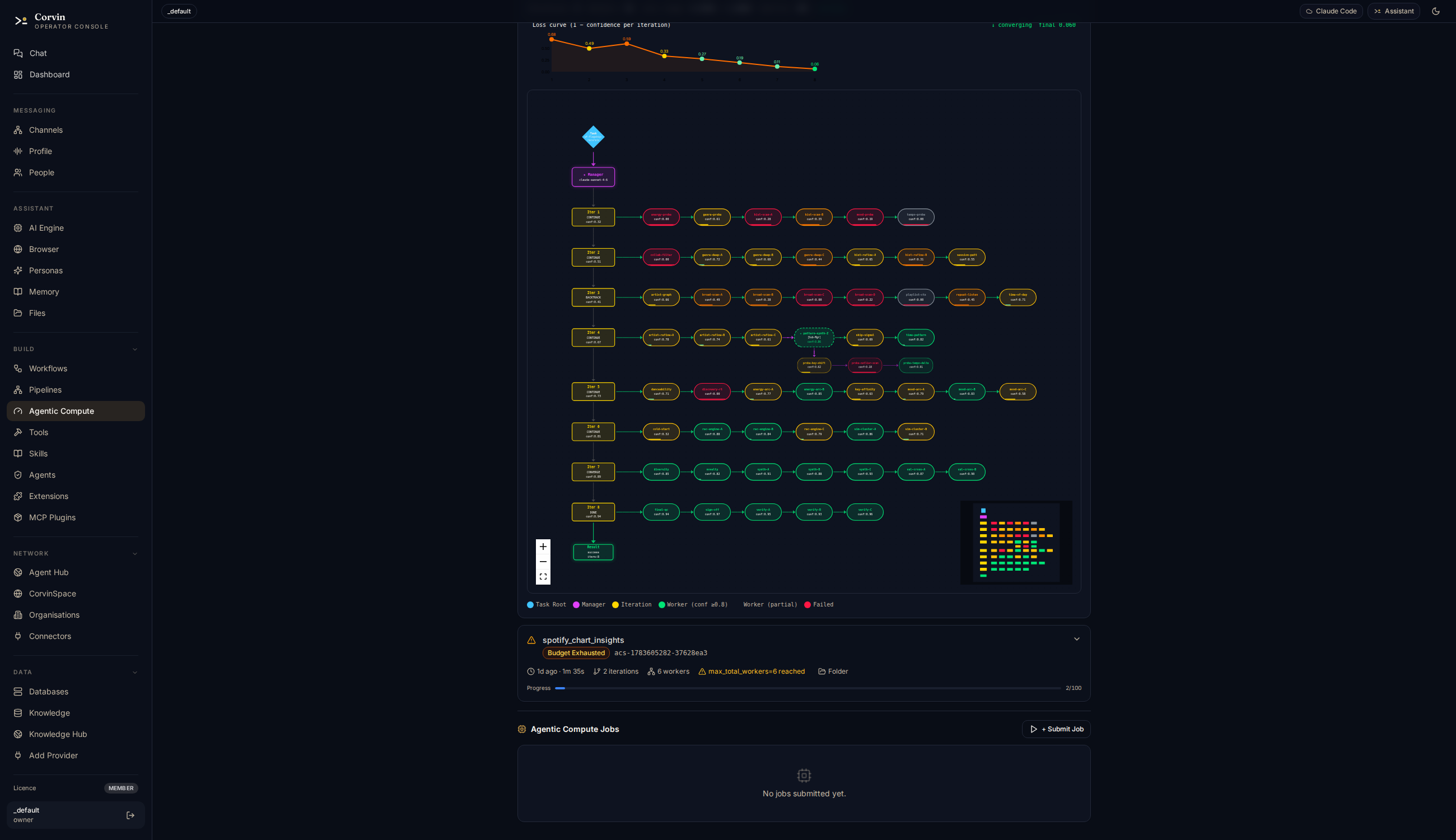
Agentic Compute is one of the more distinctive published ideas: the model frames what to optimize and when to stop; a sandboxed worker runs grid, random, or Bayesian sweeps and streams progress back—so tokens are not burned on every iteration of a long loop. The site walks through loss-driven loops that also appear in engineering disciplines (tests, refinement, method evolution). Treat the deeper “Loss-Driven Development” narrative as product philosophy you can adopt—not as a required religion to get value from the Free tier.
The data firewall story is equally important for trust. Register a dataset once: the model sees an opaque handle, schema, and redacted sample; the sandbox sees the real file path. Named connectors include Postgres, MySQL/MariaDB, Snowflake, BigQuery, Redshift, S3, Azure Blob, Delta Lake, plus CSV/Parquet/GCS. PII handling modes (drop, redact, pseudonymize, mask-partial, aggregate-only, hash) are listed on the site. Verify connector depth and redaction behavior in your environment before you point it at production warehouses.
Browser control and memory
The platform section describes driving a real Chromium—navigate, fill, click, read—while you watch. Conversation memory is described as FTS5 SQLite recall with PII-redacted indexing and GDPR Art. 17–oriented erasure via a /forget style command. Those are high-value claims for agent platforms; they are also the kind of features that fail quietly if misconfigured. Put them on your pilot checklist.
Compliance by architecture (claims)
Public materials describe:
- One-time AI-nature disclosure (framed against EU AI Act Art. 50), structurally locked so it cannot be disabled by config
- Deny-by-default consent for transcript sharing (GDPR Art. 6 & 7 framing), per-user and TTL-capped
- SHA-256 hash-chained audit (GDPR Art. 30 & 32 framing), offline-verifiable
- Data-residency / egress controls and compliance-zone routing (Art. 14 framing)
- Instance Governance ID: locally generated Ed25519 key becomes a Corvin Labs–signed certificate at license activation, optionally hardware-tethered, offline-verifiable
The site also references ISO/IEC 42001 and NIST AI RMF as frameworks it aims at. None of that replaces your counsel, DPIAs, or regulator relationships. It means the product is designed around those constraints in published architecture—not that installing CorvinOS auto-completes your legal program.
A2A mesh and multi-tenant isolation
A2A (agent-to-agent) appears as signed task envelopes across teams/instances—useful if you want delegation between orgs or environments without building your own RPC and auth story. Free advertises 1 A2A peer; Member lifts the cap. Multi-tenant isolation for users, personas, and teams is a README headline; Enterprise adds SSO and deeper governance controls.
Marketplace and locked core
CorvinOS is positioned as a platform you extend by dropping files into a config tree—personas, Forge tools, skills, extension layers, bridge adapters, workflow packages, and pluggable compute backends. The site claims seven extension surfaces, most hot-reloading on the next message, with events written to the audit log. Critically, it says the corvin.* core stays cryptographically locked so an extension can add a guardrail but not weaken one. Community extensions live in an open, MIT-licensed marketplace on GitHub (Corvin-Marketplace). That locked-core + open-extensions model is a thoughtful trust story—if the crypto/locking claims hold up under your review.
Getting started: what the install actually promises
The README’s quick start is unusually friendly for this category. The shell/PowerShell installers bring their own Python via uv and set up Hermes so you can start local-first. Offline-capable voice (Piper TTS + pywhispercpp/whisper.cpp STT) is described as shipping in the base install story, with nuances: some TTS models are fetched by corvin-install, while a bare pip install corvinos may fall back to internet-dependent TTS until you run the fuller installer once. Power users can opt into corvinos[voice] extras.
Operationally, plan for:
- A machine (or VM) you are willing to treat as an agent host
- Credentials for whichever messengers and cloud engines you enable
- A clear data boundary (what the sandbox may read; what must never enter model context)
- Time to read bridge and console docs before inviting the whole company in
The web console at localhost:8765 is the control plane for sessions, personas, forge tools, skills, RAG providers, audit logs, voice, session workdirs, browser automation, and a REST API under /v1/console/ per the README. Use it for setup even if day-to-day control later moves to Telegram or Slack.
Who should use it
- Platform / MLOps / internal tools teams that want a self-hosted agent runtime with bridges and engines under one audit spine.
- Organizations evaluating agent infrastructure where data residency, offline/local models, or hash-chained audit matter more than a pretty hosted UI.
- Builders comfortable with Apache-2.0 who will actually operate a console, bridges, and engine credentials.
- Teams okay starting on Free caps, then paying €10/device/month when concurrency and multi-tenant limits bite.
- Groups that want an extension marketplace and packaging (
.awpkg/ workflow replay) rather than rewriting glue for every new skill.
Who should avoid it
- Buyers who want a fully managed hosted agent SaaS with no install, no bridges to configure, and no ops ownership.
- Non-technical operators expecting a consumer chat app—the product is an OS-shaped platform.
- Procurement teams that need a third-party compliance certificate or completed audit report today, rather than architecture claims plus an audit chain they must operate.
- Groups that only need one narrow bot and will never use Forge, AWP, multi-engine delegation, or compute—the depth will feel like overhead.
- Teams unwilling to maintain messengers, model keys, and host patching. Self-host means you own the uptime story.
Pricing and value
Pricing is published on corvin-labs.com at the time of this review:
| Plan | Price | Published highlights |
|---|---|---|
| Free | €0 forever | Self-hosted Apache-2.0; all 7 messaging bridges; hash-chained audit & compliance features as shipped; 1 tenant, 1 concurrent workflow, 1 RAG provider, 1 A2A peer, 1 compute unit/day, 1 Data domain |
| Member | €10 / device / month | Everything in Free, limits lifted (unlimited tenants, workflows, compute, RAG, A2A, Data domains); cancel anytime |
| Enterprise | Custom | Member plus SSO / multi-tenant governance, residency controls, portal/roadmap access, priority support & SLAs |
Read the Free tier carefully. You get the full product shape—bridges, audit, compliance mechanisms as shipped—not a toy binary with features stripped. What you do not get is scale: one concurrent workflow and one compute unit per day will clip real team use quickly. That is an honest freemium design: learn and prototype without a card, pay when the OS becomes load-bearing.
Member pricing is blunt and aggressive. There is no seat spreadsheet on the public page—per device / month. If you already pay for model APIs and host a VM, €10 is mostly unlocking concurrency and multi-tenant scale, not buying the core binary (which remains Apache-2.0 to self-host). Enterprise is the path when you need SSO, residency controls, and a support agreement; expect a conversation with [email protected] rather than a checkout button.
Value read: for labs and serious indie teams, Free → Member is one of the clearer price ladders in agent infrastructure. For large regulated enterprises, the interesting question is less €10 and more whether Governance ID, audit export, and residency controls survive your security review.
Pros and cons
Pros
- Genuine self-hosted / Apache-2.0 story with concrete install paths on macOS, Linux, and Windows
- Wide messenger bridge list plus multi-engine runtime under one session/audit model
- Ambitious but coherent platform pieces: Forge, SkillForge, AWP, Agentic Compute, A2A, browser control, audit chain
- Data firewall and compute design show real thought about context limits and PII
- Compliance framed as code constraints, not brochureware alone
- Transparent Free vs Member caps and aggressive Member price
- Extension marketplace with a claimed locked core so community code cannot silently weaken guardrails
Cons
- Steep conceptual load—an OS, not a single feature; onboarding takes intent
- Free caps (1 tenant / 1 concurrent workflow / daily compute unit) will clip real team use quickly
- Compliance claims need your counsel; we did not validate legal sufficiency for any jurisdiction
- Bridge, browser, and DB connector reliability will vary by environment—verify before production
- Enterprise value depends on unpublished custom quotes and support terms
- “Device” metering for Member should be confirmed against how you actually deploy (laptop vs server vs fleet)
Comparison: CorvinOS vs common alternatives
| Capability | CorvinOS | Hosted agent SaaS | DIY LangChain-style stack |
|---|---|---|---|
| Self-host / own runtime | Yes (core) | Usually no | Yes (you build it) |
| Multi-messenger bridges | Yes (published list) | Varies / add-ons | DIY |
| Multi-engine plug-in | Yes (positioned) | Often single vendor | DIY |
| Runtime tool forging | Yes (Forge) | Rare | DIY |
| Hash-chained audit | Yes (positioned) | Varies | DIY |
| Data firewall / large files | Yes (positioned) | Varies | DIY |
| Ops burden | You run it | Vendor runs it | You run everything |
| Starter price | €0 / €10 device-mo | Often higher seats | Eng time |
Hosted SaaS wins when you refuse ops and accept vendor lock-in for speed. DIY frameworks win when you need a totally custom shape and already have platform engineers to maintain glue. CorvinOS’s bet is a batteries-included agentic OS you still own—more product than a framework, more ownership than a SaaS.
Against “another open-source agent repo,” CorvinOS’s differentiators on paper are the bridge mesh, compliance-oriented audit/consent/disclosure locks, Agentic Compute + data firewall, and packaging/marketplace story. Against enterprise Bot platforms, its differentiator is open-source self-host and multi-engine flexibility—at the cost of you running the host.
Real use cases
- Support / ops fleet: One instance bridged to Slack and Telegram, shared personas, rate limits, audit trail for every tool action when something goes wrong at 2 a.m.
- Local-first research lab: Hermes/Ollama offline, voice in the console, Forge tools for messy experiments, without defaulting every byte to a vendor cloud (still verify STT/TTS and engine egress).
- Analyst / quant-style workflow: Register a large CSV or warehouse source behind the data firewall; let Agentic Compute or recursive delegation work the bytes while the model sees handles and summaries.
- Internal automation package: Describe a Monday MRR/churn brief in natural language, save the discovered graph as an AWP workflow, export an
.awpkg, and replay it next quarter with new bindings. - Multi-team agent mesh: Use A2A so one team’s instance can hand signed tasks to another without building a custom bus—once you are off the Free single-peer cap.
Limitations and honesty checks
CorvinOS’s marketing is confident. A few checks keep a review honest:
- Compliance ≠ certification. Architectural locks help; they do not replace policies, training, DPIAs, or regulator dialogue.
- Self-host means ops. Patching, backups, bridge outages, and key rotation are yours.
- Model quality is external. The OS can route brilliantly and still look dumb if the attached engine is wrong for the task.
- Early production risk. As with any ambitious open-source platform, pin versions, read SECURITY.md, and pilot on non-critical data first.
- Member “per device”. Confirm what counts as a device in your topology before you forecast spend.
Editorial ratings
Scores reflect public product depth and pricing—not a production soak test or legal compliance rating. Ease is capped because the conceptual load is real; value is high because Free is capable and Member is inexpensive for what it unlocks.
| Category | Score |
|---|---|
| Ease of getting started | 7/10 |
| Value for money | 9/10 |
| Agent & engine depth | 8/10 |
| Workflows & compute | 8/10 |
| Platform depth | 9/10 |
| Overall | 8.2/10 |
Verdict
CorvinOS is unusually serious for an open-source agent launch. Bridges, engines, Forge, SkillForge, workflows, compute, browser control, A2A, marketplace extensions, and an audit spine are presented as one OS—not a thin wrapper around a single model API. The pricing ladder is clear, the install story is concrete, and the compliance narrative is more architectural than most peers—while still requiring your own legal judgment.
Buy Member (or start Free) if you want a self-hosted agentic OS, will operate it, and care about messenger reach, runtime tool generation, and architectural compliance hooks.
Skip if you need zero-ops hosted agents, a consumer chat UX, or a procurement stamp that no open-source install can provide by itself.
Independent platform teams will likely get the most from a Free install this week and a Member key when the one-workflow cap starts lying about your ambitions. Larger regulated orgs should treat Enterprise and a security review as the real buying motion—not the €10 line item.
Bottom line: CorvinOS is a strong pick for teams building AI organizations on infrastructure they control—ambitious, priced fairly, and worth running before you renew another opaque agent SaaS invoice.
FAQ
What is CorvinOS best for?
Self-hosting an agentic OS: multi-bridge messaging, pluggable LLM engines, runtime tools/skills/workflows, compute over large data without dumping it into context, and an audit trail—under Apache-2.0.
How much does CorvinOS cost?
At time of review: Free €0 with published caps; Member €10 per device per month to lift limits; Enterprise custom. Confirm on corvin-labs.com.
Is CorvinOS open source?
Yes. The project is published under Apache-2.0 on GitHub. The community marketplace is described as MIT-licensed.
Does CorvinOS make us EU AI Act / GDPR compliant automatically?
No. CorvinOS implements architectural controls the vendor maps to EU AI Act and GDPR articles (disclosure, consent, audit, residency). Your deployment, policies, and counsel still decide compliance.
Can it run fully offline?
The README describes local-first operation with Ollama/Hermes and local STT/TTS options. Cloud engines and some TTS fallbacks need network—choose components to match your egress policy.
How do I install CorvinOS?
Public quick start: curl -fsSL https://corvin-labs.com/install.sh | sh (macOS/Linux), PowerShell install.ps1 on Windows, or pip install corvinos then python -m corvinOS for the web console at http://localhost:8765.
What messaging apps does it support?
Published bridges include Discord, Telegram, WhatsApp, Slack, Email, Microsoft Teams, and Signal. Custom bridges can be added via the plugin/extension system.
What is the difference between Free and Member?
Free includes the self-hosted product shape (including bridges and audit as shipped) but caps tenants, concurrent workflows, RAG providers, A2A peers, daily compute, and Data domains at 1 each. Member lifts those limits for €10/device/month.
 Convoro
 1-Click Linux
 Tracking Personal Finances using Python